Code
print("Hello World")[1] "Hello World"This first laboratory introduces R, the language and environment you will use throughout the course. By the end of this lab you will be able to:
apply() family of iteratorsdplyr/tidyr, and plot with ggplot2
R is case sensitive! Mean and mean are not the same thing.
R is a scientific software package developed by The R Foundation for Statistical Computing and distributed from their website https://www.R-project.org.1
The name is partly based on the first names of the first two R authors (Robert Gentleman and Ross Ihaka), and partly a play on the name of the Bell Labs language S (Hornik, 2007). S is a very high-level language and environment for data analysis and graphics, born from discussions at Bell Labs in 1976. R is one particular implementation of the S language.
Although R is slightly different from MATLAB, its functionality is similar and it offers powerful packages for pattern recognition and multivariate analysis. It has a strong, active community and is under continuous development. Ports exist for many members of the Unix family (GNU/Linux, macOS, Solaris, …) as well as Microsoft Windows.
Several user interfaces are available — an Emacs mode (ESS), Rcmdr, and RKWard among them. We strongly recommend using RStudio in this class.
To follow this laboratory you will need:2
You can work in RStudio (recommended), in the native R application on macOS or Windows, or in a terminal by typing R. A current session begins with output similar to this (the version and platform will differ):
$ R

R version 4.x.y (YYYY-MM-DD) -- "release nickname"
Copyright (C) YYYY The R Foundation for Statistical Computing
Platform: your-platform

R is free software and comes with ABSOLUTELY NO WARRANTY.
...
Type 'q()' to quit R.

>
Launch RStudio in the usual way for your operating system and create an RStudio Project for your work on these labs.
The first thing to learn in any language is how to ask for help. In R we use help(). For instance, to check the syntax of getwd():
help("getwd")The command help.start() launches the help system in a browser. You can call help(print) and then run your first Hello World:
print("Hello World")[1] "Hello World"A very useful way to find help is the example() function, which runs example uses of a command:
example(ls)The help system can be searched for a pattern with help.search().
Use a project so code and data paths are reproducible. In RStudio, choose File → New Project and keep scripts and data inside that project. getwd() shows the current project directory. Although setwd() changes it temporarily, avoid machine-specific absolute paths in work you submit:
getwd()Assignment uses the <- operator. To assign a value to a variable a:
List the objects living in memory with objects() (note we also define a small function myfunc here so the next example has something to remove):
myfunc <- function(x) x^2
objects()
[1] "a" "b" "myfunc"Remove objects from your session with rm():
It is easy to save variables to an R data file (.RData):
To save the complete workspace:
save.image(file = "backup.RData")You quit an R session with q(). R can also be called for batch processing from the shell:
$ R [options] [< infile] [> outfile]where the commands to process are read from infile and output is logged to outfile.
The simplest structure is a numeric vector, built with the concatenate function c():
Note that c(2.3, 3, 5, 7, 7.5, 7, 5, 4) -> x has the same effect. Simple arithmetic works as in other languages (+ - * / ^), as do functions such as log, exp, sin, cos, tan, sqrt.
A regularly spaced vector is generated with seq():
sq <- seq(5, -2, by = -0.5)Arguments in R are matched by name, and in the absence of a name, by position, so the following produces the same result:
sq <- seq(by = -0.5, to = -2, from = 5)Test the effect of comparing a number with a vector:
big <- x > 5
big
[1] FALSE FALSE FALSE TRUE TRUE TRUE FALSE FALSECan you interpret the output of which(big)? Try it.
big <- x > 5 is FALSE FALSE FALSE TRUE TRUE TRUE FALSE FALSE. which(big) returns the positions that are TRUE, i.e. 4 5 6 — the indices of the elements of x greater than 5 (values 7, 7.5, 7).
R functions behave differently depending on the class of their input. The c() function also concatenates characters, and summary() behaves differently for numeric and character data:
Any object can be indexed. Vector elements are retrieved with the [ operator:
x[3][1] 5x[c(3, 5)][1] 5.0 7.5x[big][1] 7.0 7.5 7.0x[which(big)][1] 7.0 7.5 7.0(x + 10)[5][1] 17.5R also supports advanced, name-based indexing for good metadata management:
Factors are the natural representation for categorical data. Any vector can be coerced with as.factor() or created with factor():
For example, suppose we have a vector of FVII blood concentrations for individuals carrying different diseases:
disease <- c("Hemophilia A", "Thrombocytopenia", "Ehlers-Danlos syndrome",
             "Hemophilia", "Ehlers-Danlos syndrome", "Thrombocytopenia", "Vasculitis",
             "Vasculitis", "Vasculitis", "Thrombocytopenia", "Myeloproliferative",
             "Thrombocytopenia", "Myeloproliferative", "Hemophilia", "Thrombocytopenia",
             "Ehlers-Danlos syndrome",
             "Thrombocytopenia", "Thrombocytopenia", "Thrombocytopenia", "Vasculitis",
             "Hemophilia A", "Ehlers-Danlos syndrome", "Thrombocytopenia", "Myeloproliferative",
             "Ehlers-Danlos syndrome", "Hemophilia B", "Hemophilia A", "Vasculitis",
             "Ehlers-Danlos syndrome", "Vasculitis")
diseasef <- factor(disease)
diseasef
[1] Hemophilia A Thrombocytopenia Ehlers-Danlos syndrome
[4] Hemophilia Ehlers-Danlos syndrome Thrombocytopenia
[7] Vasculitis Vasculitis Vasculitis
[10] Thrombocytopenia Myeloproliferative Thrombocytopenia
[13] Myeloproliferative Hemophilia Thrombocytopenia
[16] Ehlers-Danlos syndrome Thrombocytopenia Thrombocytopenia
[19] Thrombocytopenia Vasculitis Hemophilia A
[22] Ehlers-Danlos syndrome Thrombocytopenia Myeloproliferative
[25] Ehlers-Danlos syndrome Hemophilia B Hemophilia A
[28] Vasculitis Ehlers-Danlos syndrome Vasculitis
7 Levels: Ehlers-Danlos syndrome Hemophilia Hemophilia A ... Vasculitissummary(diseasef)Ehlers-Danlos syndrome Hemophilia Hemophilia A
6 2 3
Hemophilia B Myeloproliferative Thrombocytopenia
1 3 9
Vasculitis
6 Arrays are created by changing the dimension attribute of a vector:
z <- rnorm(10)
z
[1] -0.92942970 0.50851372 -0.13969960 0.51237322 -0.80105413
[6] 0.15344790 -0.45674586 0.09644641 0.69417869 0.50827504 [,1] [,2]
[1,] -0.9294297 0.15344790
[2,] 0.5085137 -0.45674586
[3,] -0.1396996 0.09644641
[4,] 0.5123732 0.69417869
[5,] -0.8010541 0.50827504Empty matrices can be built with array() (e.g. array(0, c(5, 2))). Elements are accessed with []:
z[3, 2][1] 0.09644641z[, 2][1] 0.15344790 -0.45674586 0.09644641 0.69417869 0.50827504z[1, ][1] -0.9294297 0.1534479Arrays are combined with cbind() and rbind() (column and row binding), and transposed with t():
tz <- t(z)Several operators exist for matrix manipulation. Matrix multiplication uses %*%:
tz %*% z [,1] [,2]
[1,] 2.0461558 -0.4398313
[2,] -0.4398313 0.9816925Other operators of interest include diag(), crossprod(), solve(), eigen(), and svd().
A list is an ordered collection of objects that need not be of the same type. Components are accessed with [[]] (by index) or $ (by name):
[1] "Coagulation Factor"l$type[1] "Coagulation Factor"l[[3]][2][1] 1e+05ty <- "type"
l[[ty]][1] "Coagulation Factor"str() prints a human-readable summary of complex objects:
str(l)List of 3
$ name : chr "FVII"
$ type : chr "Coagulation Factor"
$ range: num [1:2] 1e+02 1e+05A data frame is a special list of class data.frame — essentially a matrix whose columns may have different types. Define a vector of FVII levels (in arbitrary units):
fvii <- c(60, 49, 40, 61, 64, 60, 59, 54, 62, 69, 70, 42, 56,
          61, 61, 61, 58, 51, 48, 65, 49, 49, 41, 48, 52, 46,
          59, 46, 58, 43)
Then build a data frame pairing the disease factor with the FVII levels:
blood <- data.frame(Disease = diseasef, FVII = fvii)
head(blood)An important part of R deals with reading data from files. The easiest way is read.table(), which reads a delimited file into a data frame. Related functions are read.csv() and read.delim(). For very large files, prefer lower-level primitives such as scan().
Objects such as data frames can be edited interactively with edit() or fix(), e.g. blood <- edit(blood).
The condition must evaluate to a single logical value. Comparison operators are && || >= > < <= == !=; the & and | operators apply element-wise to vectors. There is also a vectorised ifelse(condition, a, b).
For loops appear much less often than in compiled languages, because R provides compact iteration via apply(), sweep(), mapply(), tapply() and friends. There are also repeat and while:
k <- 3
while (k > 0) { print(k <- k - 1) }
[1] 2
[1] 1
[1] 0R lets you define your own functions:
FunctionName <- function(x, y) { x + y }
FunctionName(3, 4)
[1] 7For example, the following implements \(f(k) = \sum_{x=1}^{k-1} x\):
\[ f(k) = \sum_{x=1}^{k-1} x \tag{1.1}\]
SerialSum <- function(k) {
  out <- 0
  while (k > 0)
    out <- out + (k <- k - 1)
  out
}
SerialSum(3)
[1] 3SerialSum(5)[1] 10The return value of a function is the result of its last expression.
Typing a function’s name shows its definition:
SerialSumfunction (k)
{
out <- 0
while (k > 0) out <- out + (k <- k - 1)
out
}
<bytecode: 0x789209f8c0>Binary operators can also be defined, with syntax like "%!%" <- function(X, y) { ... }.
Create a function that, given a vector \(x = x_1 \cdots x_N\), computes
\[ y = \frac{\sum_{k} k \, x_k^2}{N} \tag{1.2}\]
apply() family and friendsThe apply() family does most of the work when an iterator is needed. With a function defined, it is easy to iterate it over a vector with sapply(), which also simplifies the output to a vector:
 [1]  1.000000  2.828427  5.196152  8.000000 11.180340 14.696938 18.520259
 [8] 22.627417 27.000000 31.622777
apply() iterates a function over rows or columns (margins). Here, using the iris dataset:
apply(iris[, -5], 2, sd)Sepal.Length Sepal.Width Petal.Length Petal.Width
0.8280661 0.4358663 1.7652982 0.7622377 apply(iris[1:10, -5], 1, summary) 1 2 3 4 5 6 7 8 9 10
Min. 0.20 0.200 0.200 0.200 0.20 0.400 0.300 0.200 0.200 0.10
1st Qu. 1.10 1.100 1.025 1.175 1.10 1.375 1.125 1.175 1.100 1.15
Median 2.45 2.200 2.250 2.300 2.50 2.800 2.400 2.450 2.150 2.30
Mean 2.55 2.375 2.350 2.350 2.55 2.850 2.425 2.525 2.225 2.40
3rd Qu. 3.90 3.475 3.575 3.475 3.95 4.275 3.700 3.800 3.275 3.55
Max. 5.10 4.900 4.700 4.600 5.00 5.400 4.600 5.000 4.400 4.90apply() over rows and columns
Explain the function calls above and the output they generate.
apply(iris[, -5], 2, sd) — margin 2 = columns: the SD of each numeric variable over all 150 flowers.apply(iris[1:10, -5], 1, summary) — margin 1 = rows: the five-number summary (min, quartiles, median, mean, max) of each of the first 10 flowers across the 4 measurements.So columns give per-variable spread; rows give per-flower summaries. iris[, -5] drops the Species factor so apply() works on a numeric matrix.
split() retrieves the strata of a data frame given a factor, returning a named list:
[1] 3names(iris.strata)[1] "setosa" "versicolor" "virginica" summary(iris.strata$versicolor) Sepal.Length Sepal.Width Petal.Length Petal.Width
Min. :4.900 Min. :2.000 Min. :3.00 Min. :1.000
1st Qu.:5.600 1st Qu.:2.525 1st Qu.:4.00 1st Qu.:1.200
Median :5.900 Median :2.800 Median :4.35 Median :1.300
Mean :5.936 Mean :2.770 Mean :4.26 Mean :1.326
3rd Qu.:6.300 3rd Qu.:3.000 3rd Qu.:4.60 3rd Qu.:1.500
Max. :7.000 Max. :3.400 Max. :5.10 Max. :1.800
Species
setosa : 0
versicolor:50
virginica : 0
by() extends split() so you can apply a method to each stratum:
by(iris[, 1:2], iris$Species, summary)iris$Species: setosa
Sepal.Length Sepal.Width
Min. :4.300 Min. :2.300
1st Qu.:4.800 1st Qu.:3.200
Median :5.000 Median :3.400
Mean :5.006 Mean :3.428
3rd Qu.:5.200 3rd Qu.:3.675
Max. :5.800 Max. :4.400
--------------------------------------------------------
iris$Species: versicolor
Sepal.Length Sepal.Width
Min. :4.900 Min. :2.000
1st Qu.:5.600 1st Qu.:2.525
Median :5.900 Median :2.800
Mean :5.936 Mean :2.770
3rd Qu.:6.300 3rd Qu.:3.000
Max. :7.000 Max. :3.400
--------------------------------------------------------
iris$Species: virginica
Sepal.Length Sepal.Width
Min. :4.900 Min. :2.200
1st Qu.:6.225 1st Qu.:2.800
Median :6.500 Median :3.000
Mean :6.588 Mean :2.974
3rd Qu.:6.900 3rd Qu.:3.175
Max. :7.900 Max. :3.800 Retrieving fvii and diseasef from Section 1.2.5, it is easy to compute the mean FVII concentration per disease with by():
by(fvii, diseasef, mean)diseasef: Ehlers-Danlos syndrome
[1] 54
--------------------------------------------------------
diseasef: Hemophilia
[1] 61
--------------------------------------------------------
diseasef: Hemophilia A
[1] 56
--------------------------------------------------------
diseasef: Hemophilia B
[1] 46
--------------------------------------------------------
diseasef: Myeloproliferative
[1] 58
--------------------------------------------------------
diseasef: Thrombocytopenia
[1] 53.22222
--------------------------------------------------------
diseasef: Vasculitis
[1] 54.83333tapply()
tapply(fvii, diseasef, mean) gives the same per-disease means as by(). It splits fvii by the levels of the factor diseasef and applies mean to each group, returning a named vector.
The aggregate() function accepts R’s formula interface for compact computations:
aggregate(. ~ Species, iris, mean)Can you compute the maximum and minimum of each variable for each species in the iris dataset?
aggregate(. ~ Species, iris, range) returns the min and max per variable per species (two columns bundled per variable), or do it separately with aggregate(. ~ Species, iris, min) and ... , max.
The most frequently used plotting function is plot(), a generic that behaves differently depending on the class of its first argument. Graphical output goes to the current graphics device — a window (X11/Windows) or a file (PDF, PNG, …); see help(Devices).
Plotting the numeric fvii variable, coloured by disease, gives Figure 1.1:
plot(fvii, col = diseasef, pch = 16)
Other standard plotting functions include hist(), dotchart(), image(), contour(), and persp(), together with lower-level primitives such as points(), lines(), text(), abline(), polygon(), and legend(). See the help for plot() and par().
Beyond base graphics, the modern R ecosystem builds plots with ggplot2 (a grammar of graphics) and adds interactivity with plotly — these are what the later labs use for their figures.
Alongside base R, most contemporary data analysis uses the tidyverse — a family of packages (dplyr, tidyr, ggplot2, readr, …) sharing a consistent “tidy data” philosophy: one observation per row, one variable per column, one dataset per file. Its tools all take a data frame in, data frame out view, which makes them composable in a way base R functions are not. You will meet both styles in this course; base R is closer to the statistical machinery, the tidyverse is often clearer for data wrangling and plotting.
Real analyses chain many steps: subset, filter, transform, summarise, plot. Writing them as nested calls quickly becomes unreadable — R evaluates them inside-out:
[1] 14.63The pipe operator rewrites the chain so it reads top-to-bottom, left-to-right, the way you think about the analysis. Base R ships the native pipe |>: it takes the result on its left and passes it as the first argument of the call on its right.
[1] 14.63round(2) works because the piped value fills the first argument and 2 fills the next — round(x, 2). A pipe is just a reordering of arguments; the two forms produce identical results. Two details are worth knowing:
%>% (from the package of the same name, loaded with the tidyverse) is the historical operator you will see in older code; the native |> behaves the same for everyday use. This manual uses |>._ (native pipe) or . (magrittr): for example blood |> aggregate(FVII ~ Disease, data = _, mean).dplyr
dplyr is the workhorse for manipulating data frames. It has a small set of verbs, each doing one obvious thing to rows or columns:
| Verb | What it does |
|---|---|
filter() |
keep rows matching a condition |
select() |
keep (or drop) columns by name |
mutate() |
add new columns (or modify existing ones) |
arrange() |
sort rows |
group_by() + summarise()
|
per-group summaries |
slice_max() / slice_min()
|
rows with the largest/smallest values |
The same per-disease FVII means from the by() example read, in dplyr:
Notice the pipe: group_by() returns a grouped table, summarise() receives it and collapses each group to one row. A longer, more realistic wrangle on the iris data shows the verbs composing:
Each line is one thought (“filter, mutate, group, summarise, sort”); if a result surprises you, comment out the tail of the pipe and inspect the intermediate table. That debuggability is the practical reason pipes dominate modern R code.
The third example is instructive: paste() wants the value in the second argument, so either use the magrittr . placeholder or an anonymous function \(x) ... (native-pipe style).
Using dplyr on the blood data frame, produce a table with: the number of individuals, the mean and standard deviation of FVII, and the minimum FVII, all per disease — without using summarise more than once.
With the iris data: (a) build a table with only Species and the two petal columns; (b) keep versicolor flowers with a petal width above 1.5 cm; (c) sort mtcars by horsepower, descending — which are the three most powerful cars?
tidyr
Where dplyr manipulates rows and columns of a tidy table, tidyr moves data between layouts. The two fundamental operations are pivot_longer() (wide → long, i.e. gather columns into a key-value pair) and pivot_wider() (long → wide, the inverse). Plotting and grouping tools in the tidyverse want long format, so you will pivot constantly:
library(tidyr)
iris_long <- iris |>
  mutate(id = row_number()) |>                       # keep track of each flower
  pivot_longer(-c(Species, id),                      # all columns except these...
               names_to = "measurement",             # ...become this key column
               values_to = "value")                  # ...and this value column
head(iris_long)
After the pivot, the four numeric columns became two columns (measurement, value) and the table grew from 150 to 600 rows — same information, tidy layout. pivot_wider(names_from = measurement, values_from = value) reverses it.
Why does pivot_longer(-c(Species, id)) need the id column added first? What happens to the result if you drop it — try iris |> pivot_longer(-Species)? And how would you pivot only Sepal.Length and Petal.Length (leaving the widths as columns)?
Without id, flowers that share a species become indistinguishable — you can no longer tell which sepal length belongs to which petal length, so pivot_wider() would silently average them away. To pivot a subset:
iris |>
  pivot_longer(c(Sepal.Length, Petal.Length),
              names_to = "part", values_to = "length")
Only the two named columns are gathered (300 rows); the widths and Species pass through untouched.
ggplot2
ggplot2 implements the grammar of graphics: a plot is built by adding layers to a mapping between data columns and visual properties. A ggplot has three ingredients:
aes(), which maps columns to x/y position, colour, size, …;geom_*() layers that actually draw (points, boxplots, lines, …).The long-format table from Section 1.7.1.3 is exactly what ggplot wants — one measurement per row — so the four iris variables can be drawn in a single faceted plot:
library(ggplot2)
ggplot(iris_long, aes(Species, value, fill = Species)) +
  geom_boxplot(show.legend = FALSE) +
  facet_wrap(~ measurement, scales = "free_y") +
  labs(x = NULL, y = "cm") +
  theme(axis.text.x = element_text(angle = 30, hjust = 1))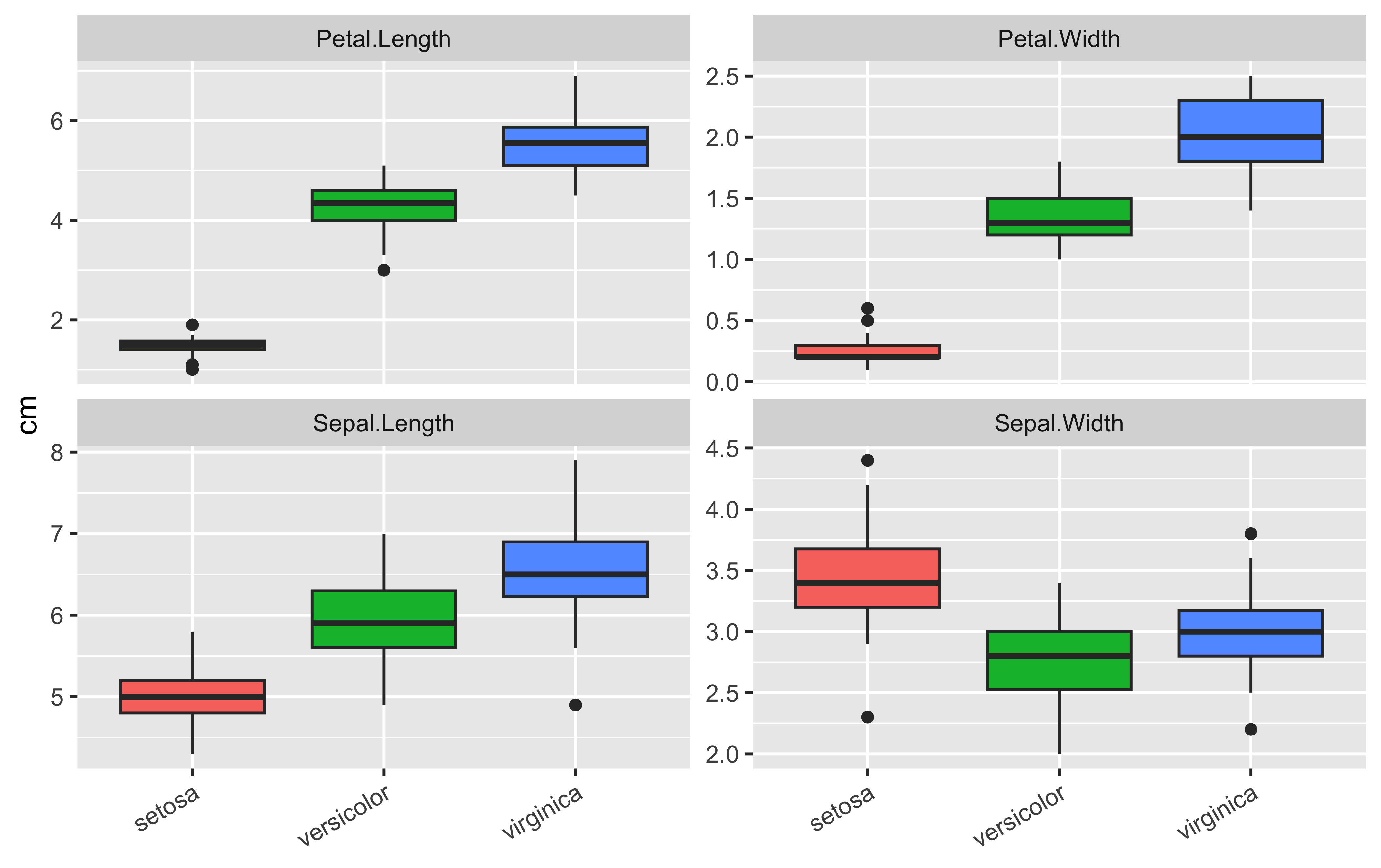
The blood data gets the same treatment — a ggplot version of the base Figure 1.1, but with the grouping variable doing the colouring inside the aesthetics:
ggplot(blood, aes(Disease, FVII, colour = Disease)) +
  geom_jitter(width = 0.2, alpha = 0.6, show.legend = FALSE) +
  stat_summary(fun = mean, geom = "point", shape = 18, size = 3) +
  labs(x = NULL, y = "FVII (arbitrary units)") +
  coord_flip()
Every layer adds to the previous one — data, then aesthetics, then geometry, then statistics, then labels and theming. Compare this with the base-graphics version: more code, but the intent of each line is explicit, legends generate themselves, and the same recipe scales to any data frame.
With the iris_long table, make: (a) a scatter of value versus measurement, coloured by species; (b) the same but with facet_wrap(~ Species); then (c) reproduce Figure 1.1 as closely as possible in ggplot2 (scatter of FVII against row number, coloured by disease).
ggplot(iris_long, aes(measurement, value, colour = Species)) +
  geom_point(alpha = 0.5)
ggplot(iris_long, aes(measurement, value, colour = Species)) +
  geom_point(alpha = 0.5) +
  facet_wrap(~ Species)
blood |> mutate(row = row_number()) |>
  ggplot(aes(row, FVII, colour = Disease)) + geom_point()
In (c), mutate(row = row_number()) creates the x coordinate the base plot got implicitly from vector position.
Starting from the blood data frame, write one piped pipeline (no intermediate variables) that adds a column FVII_low = FVII < median(FVII), computes per-disease counts of low/high FVII, and feeds the result straight into a ggplot stacked bar chart.
Packages bundle functions, data, and documentation for a specific purpose. List installed packages with library(), and list currently loaded packages with search():
search() [1] ".GlobalEnv" "package:ggplot2" "package:tidyr"
[4] "package:dplyr" "package:stats" "package:graphics"
[7] "package:grDevices" "package:utils" "package:datasets"
[10] "package:methods" "Autoloads" "package:base" There are thousands of contributed packages, catalogued at CRAN. A set specialised in bioinformatics is Bioconductor. Install a package from the command line with install.packages("<packagename>").
Check the output of the data() function, read its help, and explain what it does. Then browse the datasets package and choose a dataset.
For your chosen dataset:
Always include the R code you wrote to answer the questions.
help.start() → Manuals in R.Worked solutions for the exercises are in the collapsed callouts below each exercise.
Write a laboratory report following the structure of this text. It should contain an introduction, the goals of each section, and a description of the results of each part. Include any graphics relevant to making your work understandable. The lab should be delivered within two weeks.
Some sections of this introduction are adapted from (Venables & Smith, 2006). The original version of this document was written in LaTeX with embedded R code through the Sweave tool; this edition is produced with Quarto.↩︎
You can install any package with install.packages("package name"). On Ubuntu Linux a base R installation is sudo apt-get install r-recommended. RStudio can be downloaded from https://posit.co/download/rstudio-desktop/.↩︎