---
title: "Differential Expression"
---
In this lab we use a differential-expression dataset available within R. The
`ALL` dataset contains a subset of 79 samples from patients with B-cell acute
lymphoblastic leukemia. Acute lymphoblastic leukemia (ALL) is a cancer that
starts from early white blood cells (lymphocytes) in the bone marrow. The dataset
was created with the HG-U95Av2 Affymetrix GeneChip array by Chiaretti et al.
(2004). Our interest is to compare samples carrying the **BCR/ABL** fusion gene —
which results from a translocation between chromosomes 9 and 22 — with normal
(**NEG**) samples.
By the end of this laboratory you will be able to:
- load and subset an `ExpressionSet` and access its expression matrix and phenotype data
- filter probesets by variability and fit a linear model with `limma` to rank differentially expressed genes
- visualise the data with PCA score plots
- cluster samples and genes (HOPACH, *k*-means) and draw a heatmap
- build and evaluate a *k*-NN classifier with leave-one-out validation and plot its decision boundary
::: {.callout-note title="Requirements"}
This lab runs with the Bioconductor packages `ALL`, `genefilter`, `limma`,
`gplots`, and the CRAN packages `pls` and `class` — all executed here. The
**HOPACH** clustering section additionally needs the `hopach` package; where it is
not installed those three chunks are shown but not run. Install any missing
packages with `BiocManager::install("<packageName>")`.
:::
```{r}
#| label: diff-setup
#| include: false
source("R/setup.R")
```
::: {.callout-note appearance="minimal" title="Lab at a glance"}
**Goal:** find and interpret differentially expressed genes between two groups.
**Prerequisites:** [Introduction to R](intro-r.qmd); [Eigenfaces / PCA](eigenfaces.qmd).
**Time:** ~2.5 h. **Packages:** `ALL`, `genefilter`, `limma`, `ggplot2`,
`pheatmap`, `DESeq2` (RNA-seq track). **Data:** `ALL` (bundled). **Deliverable:** a lab report.
:::
## Data description {#sec-diff-data}
Load the `ALL` data:
```{r}
#| label: all-load
library("ALL")
data(ALL)
dim(ALL)
experimentData(ALL)
```
::: {.callout-tip title="✅ Exercise 7.1 — Objects"}
What has been loaded into the workspace? What kind of objects are they?
:::
::: {.content-hidden when-format="pdf" unless-profile="solutions"}
::: {.callout-tip collapse="true" title="Solution 7.1"}
`data(ALL)` loads an **`ExpressionSet`** named `ALL` (from the `ALL` package): 12835
probesets × 128 samples, with a `pData` phenotype table built in.
:::
:::
`pData()` accesses the phenotypic data and metadata:
```{r}
#| label: pheno
pheno <- pData(ALL)
```
::: {.callout-tip title="✅ Exercise 7.2 — Phenotypes"}
What are the names of the phenotype variables? Explain each one. (Hint:
`varLabels()` and `varMetadata()`.)
:::
The phenotype of interest is `mol.biol`. Build a subset containing only the
BCR/ABL and NEG samples, restricted to B-cell lymphocytes:
```{r}
#| label: pheno2
subset <- intersect(grep("^B", as.character(pheno$BT)),
                    which(pheno$mol %in% c("BCR/ABL", "NEG")))
esub <- ALL[, subset]
dim(esub)
```
::: {.callout-tip title="✅ Exercise 7.3 — Selection"}
Explain how the first line of the code above builds the selection.
:::
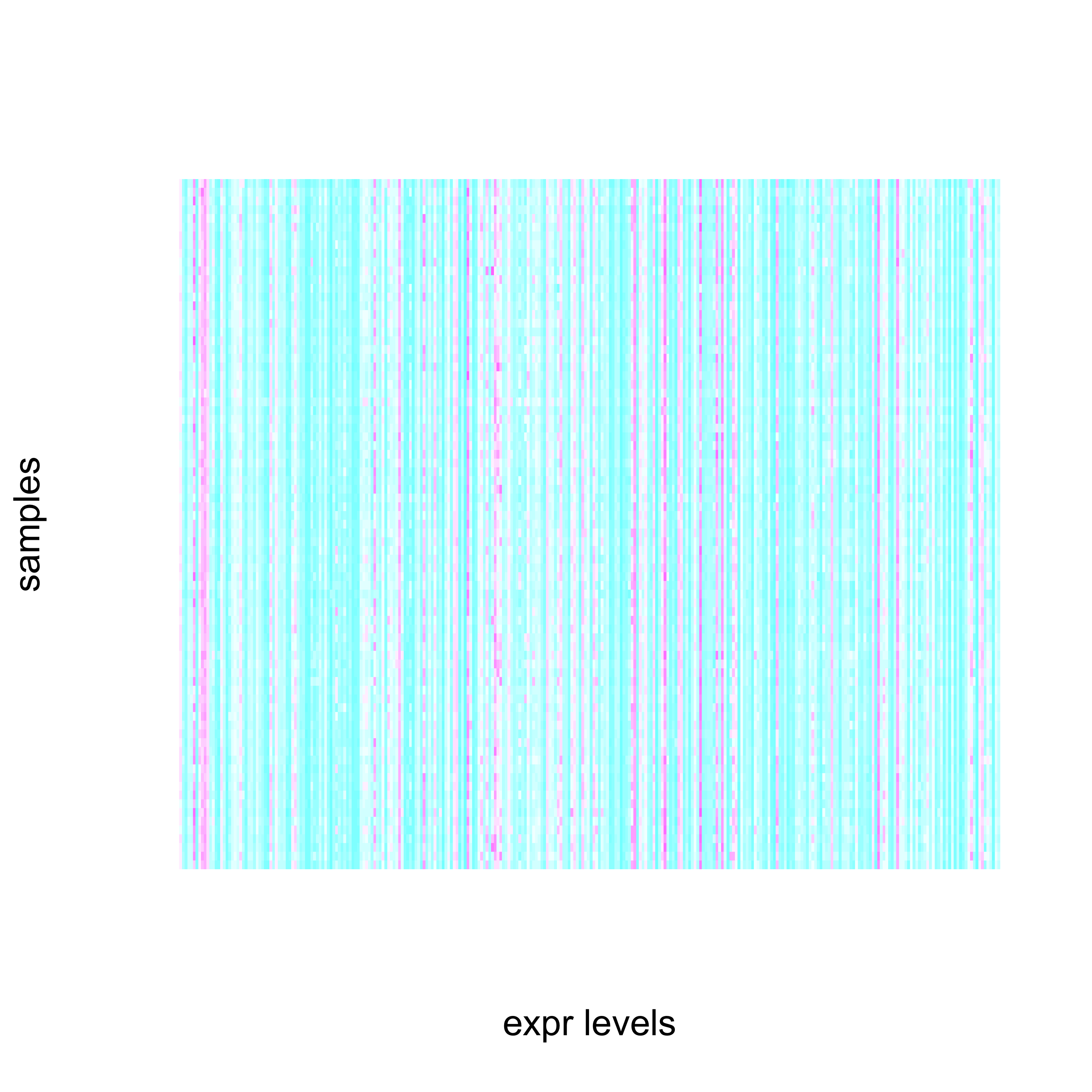
`exprs()` extracts the expression matrix. We visualise the first 300 probes across
all samples with `image()`:
```{r}
#| label: fig-expr-image
#| fig-cap: "Visual representation of the first 300 expression probes across all samples."
#| fig-width: 5
#| fig-height: 5
eS <- exprs(esub)
image(eS[1:300, ], ylab = "samples", xlab = "expr levels",
      axes = FALSE, col = cm.colors(20))
```
::: {.callout-tip title="✅ Exercise 7.4 — MA plot"}
Draw an MA plot for two different samples and describe what you see.
:::
::: {.content-hidden when-format="pdf" unless-profile="solutions"}
::: {.callout-tip collapse="true" title="Solution 7.4"}
For the first two samples: plot `M = exprs(esub)[,2] - exprs(esub)[,1]` (log fold
change) against `A = (exprs(esub)[,2] + exprs(esub)[,1])/2` (average intensity).
A well-behaved pair hugs the `M = 0` cloud with no systematic slope; a tilting
cloud would mean the two samples need normalisation.
:::
:::
## Gene filtering {#sec-diff-filtering}
First filter out probesets with low variability across samples. We require
expression above 100 fluorescence units in more than 25% of samples, and an
interquartile range of at least 0.5 on the log2 scale, using Bioconductor's
`genefilter`:
```{r}
#| label: filter1
library(genefilter)
fa  <- pOverA(0.25, log2(100))
fb  <- function(x) (IQR(x) > 0.5)
fab <- filterfun(fa, fb)
selec <- genefilter(esub, fab)
esubf <- esub[selec, ]
esubf$mol <- factor(esubf$mol)
```
::: {.callout-tip title="✅ Exercise 7.5 — Filtering"}
1. How many probesets are finally selected?
2. Explain the filtering code.
3. Replot the MA plot, marking the discarded probes. Explain the results.
:::
::: {.content-hidden when-format="pdf" unless-profile="solutions"}
::: {.callout-tip collapse="true" title="Solution 7.5"}
- **2391** of 12625 probesets pass (`selec` is a TRUE/FALSE flag per probeset; `selec[esub]` keeps them).
- `filterfun` combines two tests: `pOverA(0.25, log2(100))` keeps a probeset only if
> 25 % of samples exceed 100 fluorescence units (log2 scale), and `fb` requires an
interquartile range > 0.5 (variability); a probeset must pass *both*.
- The MA plot with discarded probes greyed shows the filter removes the
low-variability floor, not the informative/high-signal genes.
:::
:::
Next, use `limma` to find the most differentially expressed genes via an
*f*-statistic. We fit a linear model of each probeset against the BCR/ABL vs NEG
factor: `model.matrix()` sets up the model, `lmFit()` fits it, `eBayes()` computes
the statistics, and `topTable()` ranks the genes:
```{r}
#| label: limma
library(limma)
initialmodel <- model.matrix(~ esubf$mol)
model      <- lmFit(esubf, initialmodel)
modelstats <- eBayes(model)
topprobes  <- topTable(modelstats, coef = 2, 25)
X <- esubf[rownames(topprobes)]
head(topprobes, 10)
```
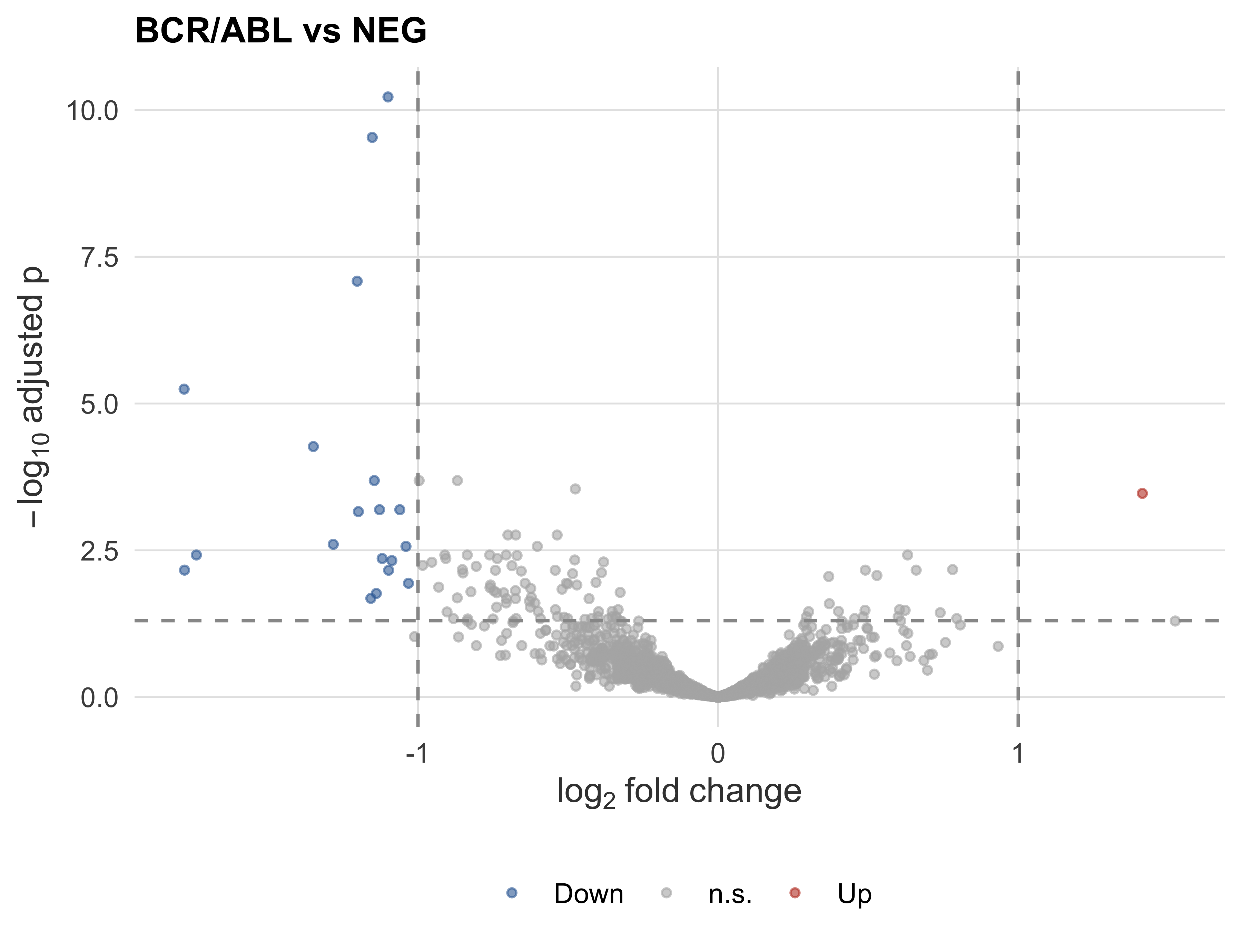
A **volcano plot** shows the whole tested set at once — effect size (log fold
change) against significance ($-\log_{10}$ adjusted p) — so the genes that are
both strongly and reliably changed stand out in the upper corners
(@fig-volcano):
```{r}
#| label: fig-volcano
#| fig-cap: "Volcano plot of BCR/ABL vs NEG. Points passing FDR < 0.05 and |logFC| > 1 are highlighted."
#| fig-alt: "Volcano plot of log fold change against negative-log10 adjusted p-value, with significant genes highlighted in the upper left and right."
#| fig-width: 6
#| fig-height: 4.6
#| message: false
library(ggplot2)
all_tt <- topTable(modelstats, coef = 2, number = Inf)
all_tt$sig <- with(all_tt, ifelse(adj.P.Val < 0.05 & abs(logFC) > 1,
                                   ifelse(logFC > 0, "Up", "Down"), "n.s."))
ggplot(all_tt, aes(logFC, -log10(adj.P.Val), colour = sig)) +
  geom_point(alpha = 0.6, size = 1.1) +
  scale_colour_manual(values = c(Up = "#c0432f", Down = "#3a6ea5", n.s. = "grey70")) +
  geom_vline(xintercept = c(-1, 1), linetype = 2, colour = "grey60") +
  geom_hline(yintercept = -log10(0.05), linetype = 2, colour = "grey60") +
  labs(x = expression(log[2]~fold~change), y = expression(-log[10]~adjusted~p),
       colour = NULL, title = "BCR/ABL vs NEG")
```
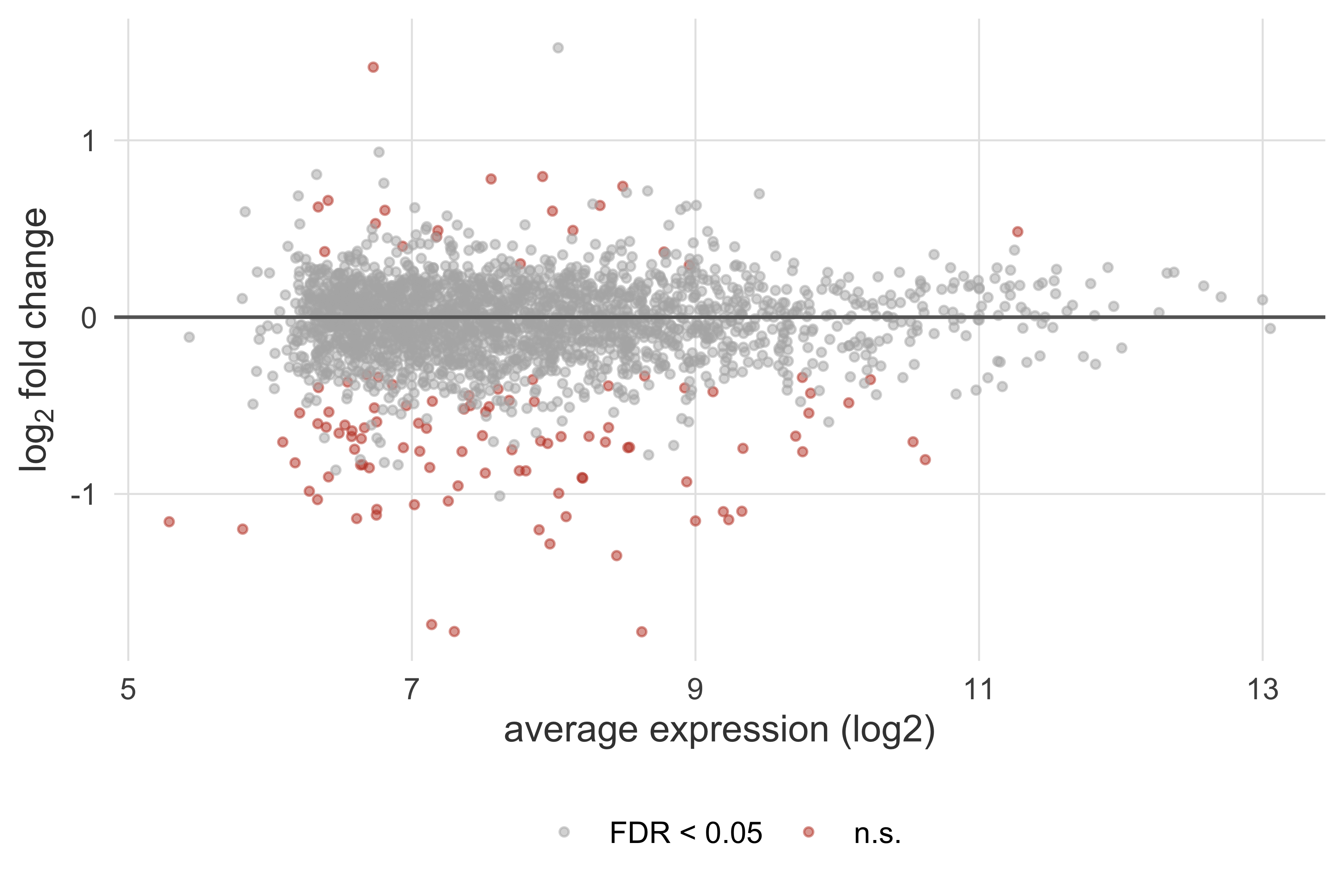
The companion **MA plot** puts average expression on the x-axis, exposing whether
fold changes depend on intensity (@fig-ma):
```{r}
#| label: fig-ma
#| fig-cap: "MA plot: log fold change against mean expression. Significant genes (FDR < 0.05) in red."
#| fig-alt: "MA plot of log fold change versus average expression, with significant genes marked in red around a flat zero line."
#| fig-width: 6
#| fig-height: 4
ggplot(all_tt, aes(AveExpr, logFC, colour = adj.P.Val < 0.05)) +
  geom_point(alpha = 0.5, size = 1) +
  scale_colour_manual(values = c(`TRUE` = "#c0432f", `FALSE` = "grey70"),
                      labels = c("FDR < 0.05", "n.s."), name = NULL) +
  geom_hline(yintercept = 0, colour = "grey40") +
  labs(x = "average expression (log2)", y = expression(log[2]~fold~change))
```
## Data visualisation {#sec-diff-viz}
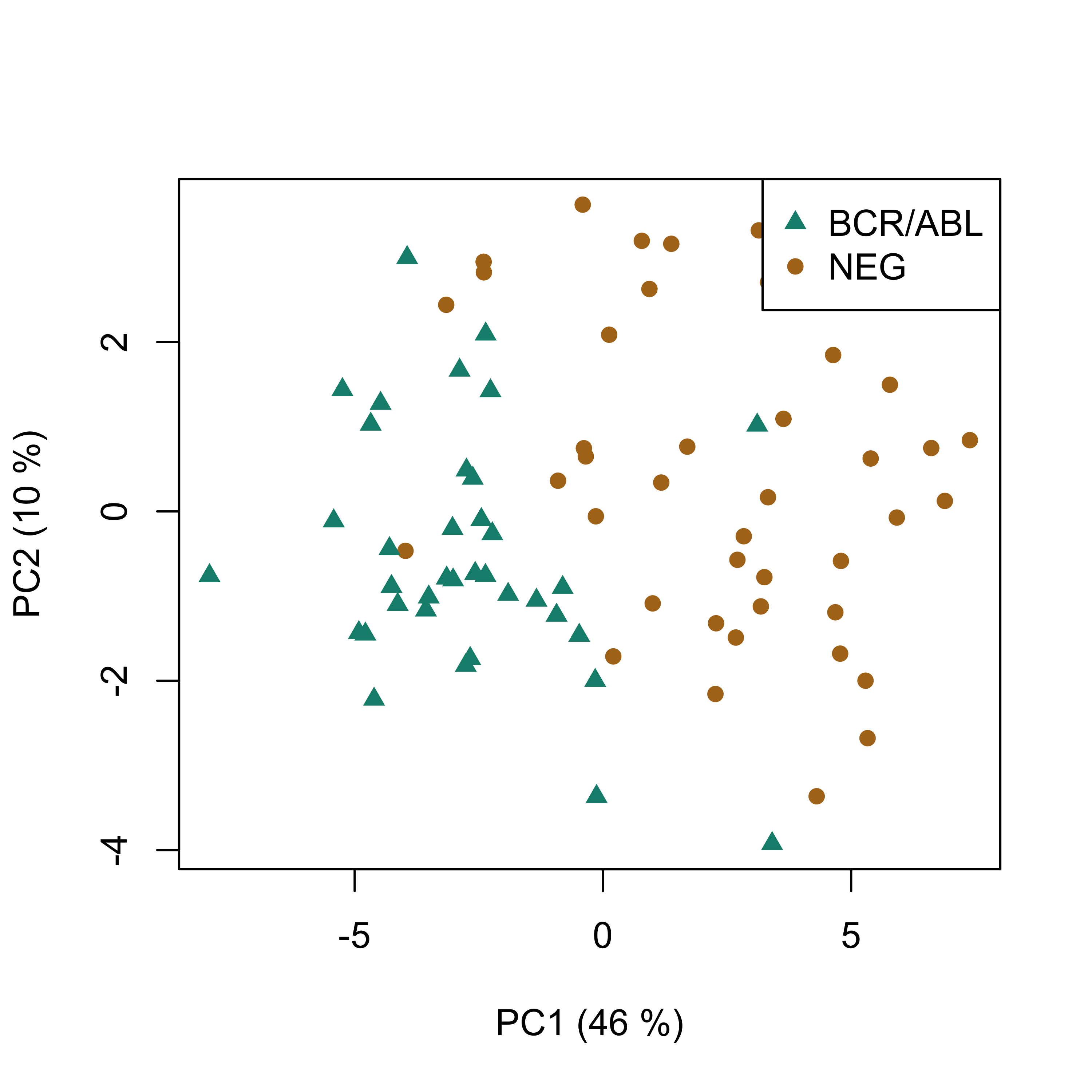
Use a linear subspace (PCA) to visualise the dataset in lower dimension, colouring
by `mol` (BCR/ABL vs NEG):
```{r}
#| label: fig-pca-all
#| fig-cap: "PCA score plot for BCR/ABL vs NEG on the ALL dataset."
#| fig-width: 5
#| fig-height: 5
#| message: false
library(pls)
vmodel <- prcomp(t(exprs(X)))
scoreplot(vmodel, col = as.numeric(X$mol),
          pch = c(17, 16)[as.numeric(X$mol)])
legend("topright", legend = levels(X$mol),
       col = as.numeric(X$mol), pch = c(17, 16)[as.numeric(X$mol)])
```
::: {.callout-tip title="✅ Exercise 7.6 — Visualisation"}
1. What method are we using to visualise the dataset?
2. Using the projection vectors in `vmodel`, can you guess a ranking of the probes
most related to BCR/ABL vs NEG?
3. Compare this with the first 10 probes from the linear model — are any probes
common to both methods?
:::
## Clustering {#sec-diff-clustering}
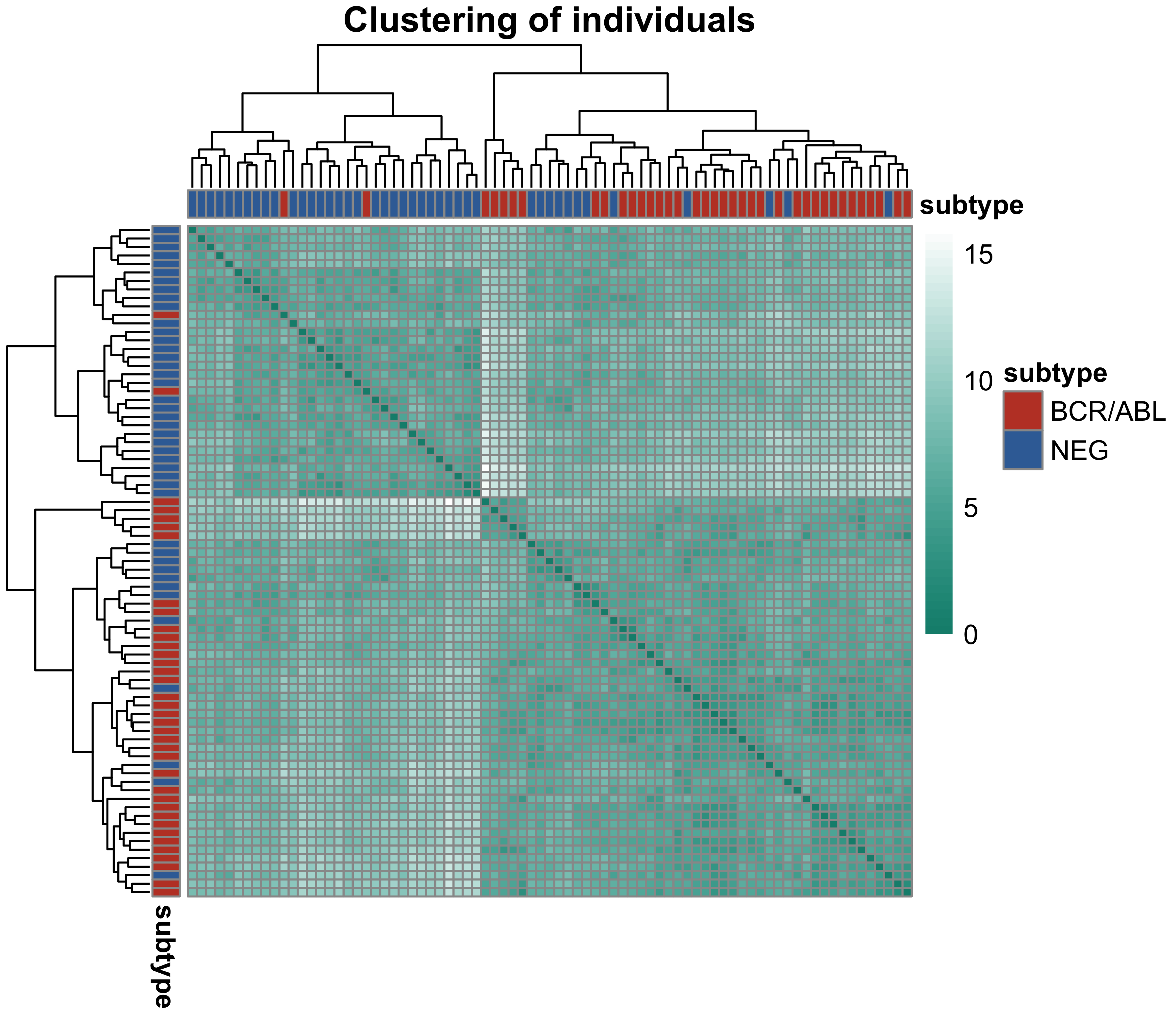
A key goal of large-scale expression studies is to find biologically important
clusters of samples and genes. The workhorse is **hierarchical clustering** of a
distance matrix. We compute sample-to-sample distances on the top probes and draw
them as an annotated heatmap with `pheatmap`, whose dendrograms cluster both axes
(@fig-sampleclust):
```{r}
#| label: fig-sampleclust
#| fig-cap: "Sample-to-sample distance matrix on the top differentially expressed probes, clustered and annotated by molecular subtype."
#| fig-alt: "Heatmap of sample-to-sample distances with dendrograms, showing BCR/ABL and NEG samples grouping largely apart."
#| fig-width: 6
#| fig-height: 5.2
#| message: false
library(pheatmap)
sampleDist <- dist(t(exprs(X)), method = "euclidean")
ann <- data.frame(subtype = X$mol)
rownames(ann) <- colnames(exprs(X))
pheatmap(as.matrix(sampleDist),
         annotation_col = ann, annotation_row = ann,
         show_rownames = FALSE, show_colnames = FALSE,
         annotation_colors = list(subtype = c("BCR/ABL" = "#c0432f", "NEG" = "#3a6ea5")),
         color = colorRampPalette(c("#0e8d7c", "white"))(50),
         main = "Clustering of individuals")
```
::: {.callout-note appearance="minimal" title="Beyond hierarchical clustering"}
More elaborate algorithms exist — e.g. **HOPACH** (Hierarchical Ordered
Partitioning And Collapsing Hybrid), which splits and re-collapses clusters to
correct mistakes, or consensus clustering. With the `hopach` package installed the
individuals cluster as `hopach(as.matrix(t(exprs(X))), dmat = distancematrix(..., d = "cosangle"))`.
:::
::: {.callout-tip title="✅ Exercise 7.7 — Gene clustering"}
Repeat the clustering on the genes (rows) instead of the samples, and compare the
gene groups with the differential-expression ranking.
:::
::: {.content-hidden when-format="pdf" unless-profile="solutions"}
::: {.callout-tip collapse="true" title="Solution 7.7"}
Clustering the expression *transpose* (genes as rows) separates the top-ranking
BCR/ABL-vs-NEG probes into up- and down-regulated blocks (they flip sign across the
two subtypes); those blocks largely coincide with the limma top table, confirming
that differential expression and the expression-driven clusters carry the same signal.
:::
:::
::: {.callout-tip title="✅ Exercise 7.8 — k-means"}
1. Use two principal components to compute a two-cluster *k*-means.
2. Find the patients in each cluster and build a table of BCR/ABL vs NEG counts.
3. Is there any relationship between the *k*-means solution and the illness?
:::
::: {.content-hidden when-format="pdf" unless-profile="solutions"}
::: {.callout-tip collapse="true" title="Solution 7.8"}
- `km <- kmeans(pX, 2)` on the first two PCs; then `table(km$cluster, X$mol)` shows
the two clusters are **strongly enriched** for one subtype each (BCR/ABL vs NEG) —
the unsupervised solution tracks the (supervised) disease label.
:::
:::
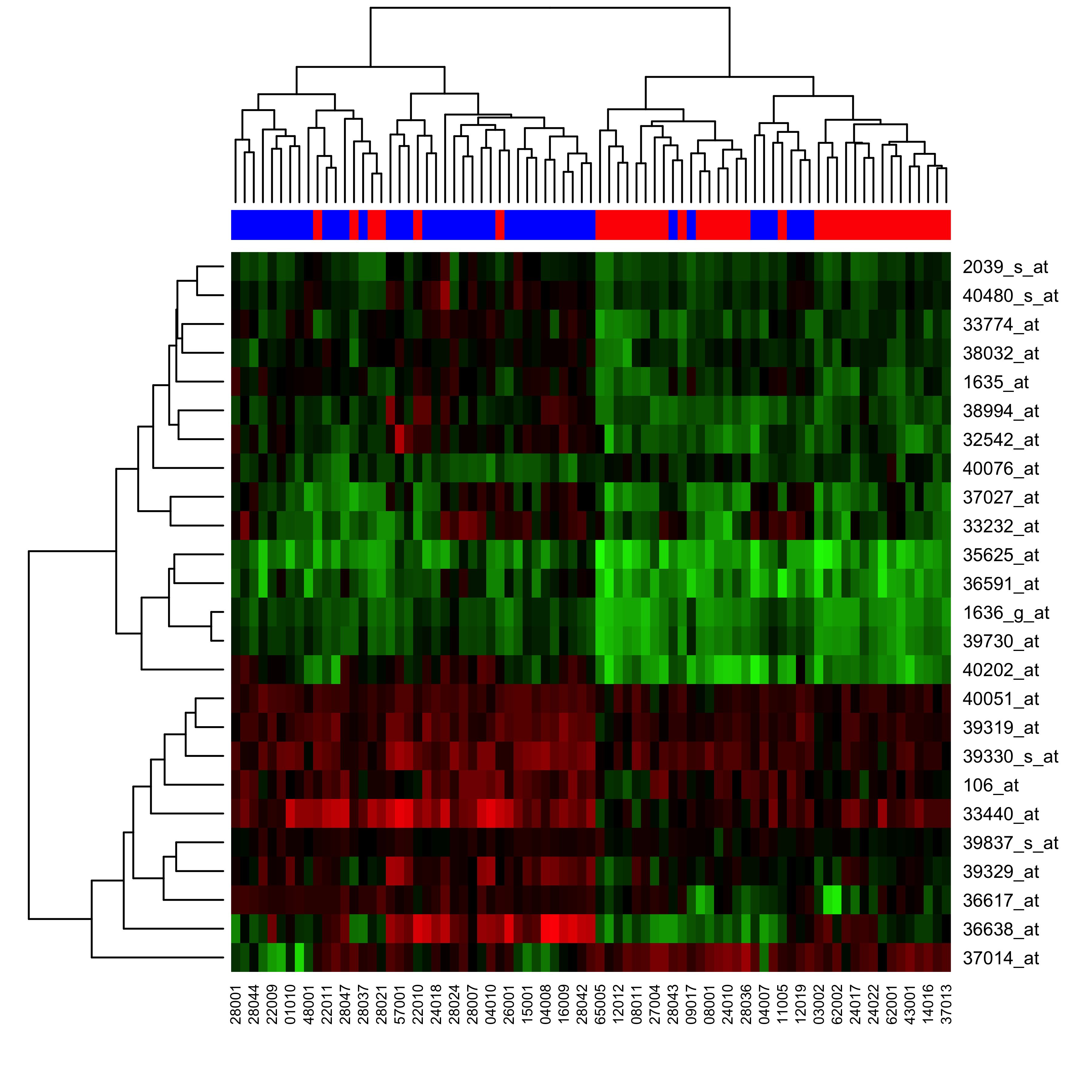
Expression is more commonly visualised with a **heatmap** — a false-colour
representation with rows and columns ordered by clustering:
```{r}
#| label: fig-heatmap
#| fig-cap: "Heatmap of the two-way clustering of gene expression for BCR/ABL vs NEG."
#| fig-width: 6
#| fig-height: 6
#| message: false
library(gplots)
cols <- c("#FF0000", "#0000FF")
names(cols) <- c("BCR/ABL", "NEG")
comap <- cols[as.character(esub$mol)]
heatmap(exprs(X), col = redgreen(100), ColSideColors = comap, scale = "none")
```
::: {.callout-tip title="✅ Exercise 7.9 — Heatmap"}
1. Explain the code.
2. Interpret the resulting plot in terms of gene expression.
:::
## Classification {#sec-diff-classification}
Can we guess BCR/ABL vs NEG from the expression profiles? As variables we use a
2D projection onto the PCA model from @sec-diff-viz, via `predict()`:
```{r}
#| label: epcap
factors <- 2
pX <- predict(vmodel)[, 1:factors]
dim(pX)
```
Check performance of a *k*-NN classifier with **leave-one-out** validation. LOO
selects one sample $j$ for prediction and trains on the remaining $i \ne j$,
iterating over all $N$ samples. In R this is `knn.cv()`; for $k = 1$:
```{r}
#| label: expknn
library(class)
pred <- knn.cv(pX, X$mol, k = 1)
```
Check performance with `table()`:
```{r}
#| label: expclass
table(pred, X$mol)
cr <- mean(pred == X$mol)
cr
```
::: {.callout-tip title="✅ Exercise 7.10 — Classifier"}
1. What is `cr`?
2. Plot the classification ratio as you increase the number of factors — what is
the optimum?
3. What is the optimum $k$ (remember $k$ should be odd)?
:::
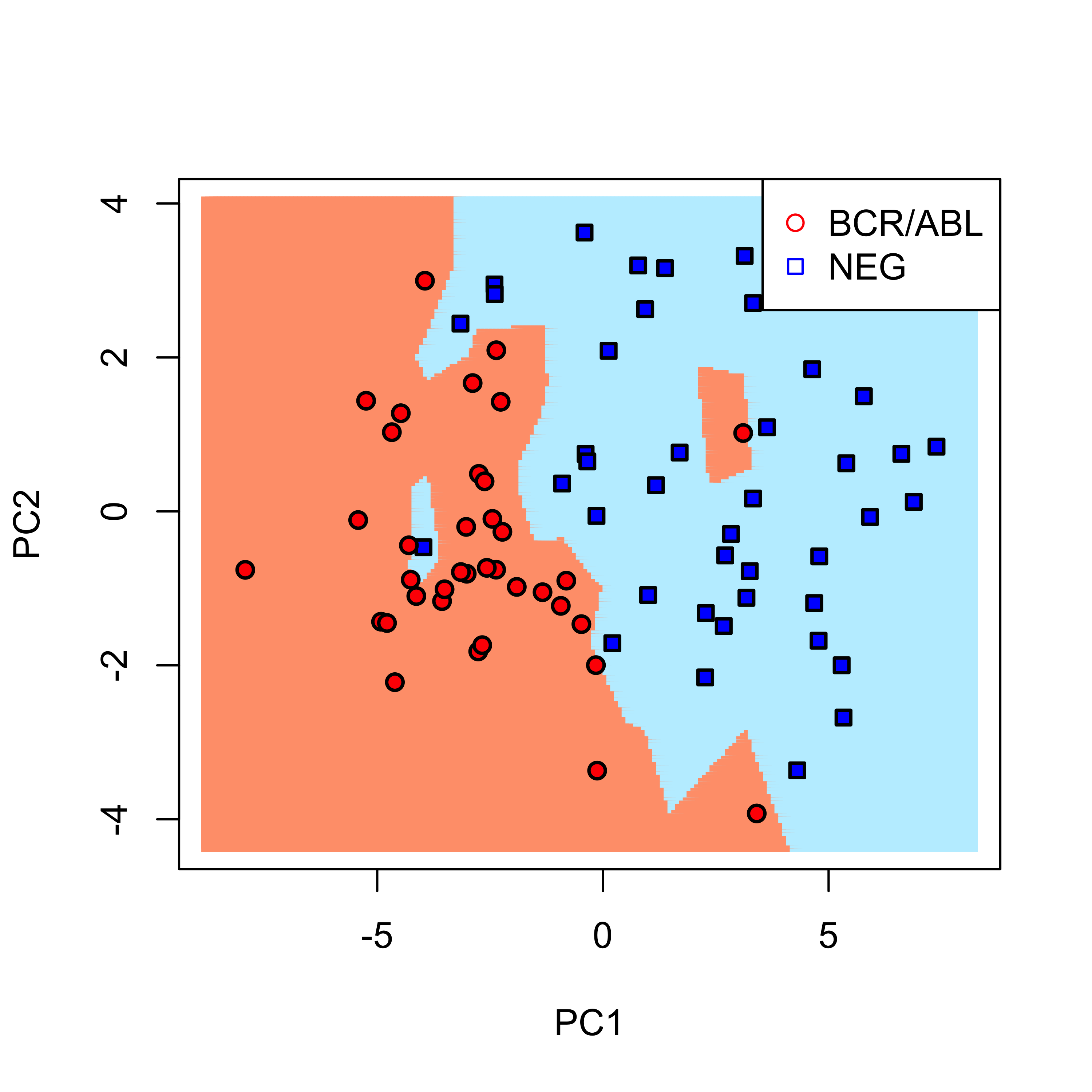
Finally, compute the classification boundary on the 2D model subspace by building
a regular grid, applying *k*-NN at each node, and colouring the plane by predicted
class:
```{r}
#| label: fig-boundary
#| fig-cap: "k-NN classification boundary for the first two PCs on the BCR/ABL vs NEG dataset."
#| fig-width: 5
#| fig-height: 5
k <- 1
grain <- 200
rgrid <- expand.grid(x = seq(1.10 * min(pX[, 1]), 1.1 * max(pX[, 1]), length = grain),
                     y = seq(1.10 * min(pX[, 2]), 1.1 * max(pX[, 2]), length = grain))
rgrid_p <- knn(train = pX, test = rgrid, cl = X$mol, k = k)
plot(rgrid, col = c("lightsalmon1", "lightblue1")[as.numeric(rgrid_p)],
     cex = 1, pch = 15, xlab = "PC1", ylab = "PC2")
points(pX, col = "black", bg = c("red", "blue")[as.numeric(X$mol)],
       cex = 1, pch = c(21, 22)[as.numeric(X$mol)], lwd = 1.5)
legend("topright", legend = levels(X$mol),
       col = c("red", "blue")[as.numeric(X$mol)], pch = c(21, 22)[as.numeric(X$mol)])
```
::: {.callout-tip title="✅ Exercise 7.11 — Decision boundary"}
Modify the code with different values of $k$. Discuss the effect of $k$ on the
classification boundary.
:::
::: {.content-hidden when-format="pdf" unless-profile="solutions"}
::: {.callout-tip collapse="true" title="Solution 7.11"}
Larger $k$ **smooths** the boundary (more neighbours → smoother, more bias); smaller
$k$ follows the training samples including noise → a wiggly, over-fitted boundary.
:::
:::
## A modern counterpart: RNA-seq with DESeq2 {#sec-diff-rnaseq}
The `ALL` data above are **microarray** intensities, analysed with `limma`. Most
expression studies today produce **RNA-seq counts**, where the analysis models
discrete counts with a negative-binomial distribution. `DESeq2` is the standard
tool. The workflow mirrors what you just did — fit a model, shrink, rank — but on
counts. Here we use a self-contained simulated count dataset so it runs anywhere:
```{r}
#| label: deseq-fit
#| message: false
library(DESeq2)
set.seed(1)
dds <- makeExampleDESeqDataSet(n = 2000, m = 12, betaSD = 1)  # 2000 genes, 12 samples
dds <- DESeq(dds, quiet = TRUE)
res <- results(dds)
summary(res)
```
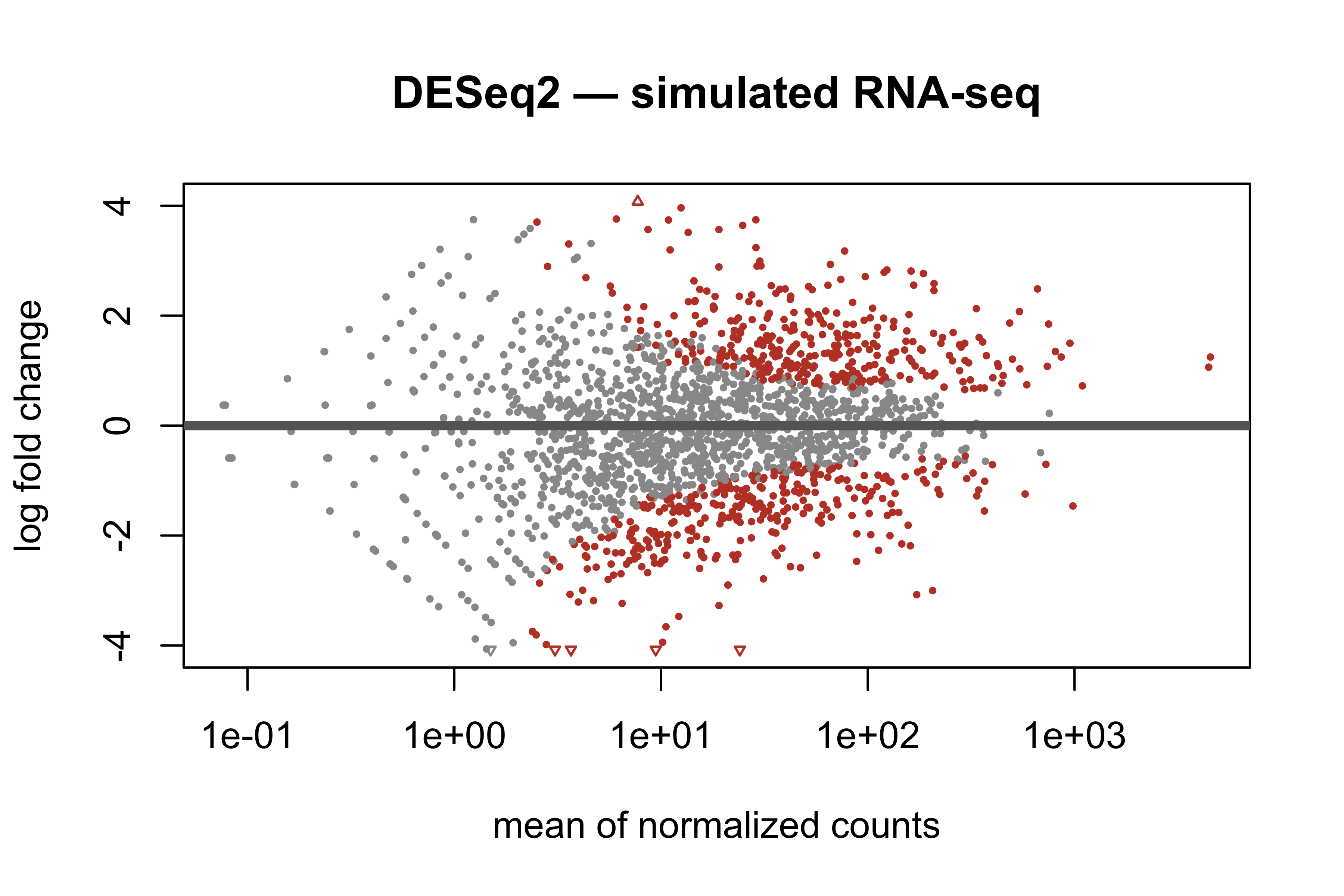
`DESeq2`'s own MA plot shrinks noisy low-count fold changes toward zero
(@fig-deseq-ma):
```{r}
#| label: fig-deseq-ma
#| fig-cap: "DESeq2 MA plot on the simulated RNA-seq data; significant genes (FDR < 0.1) in colour."
#| fig-alt: "DESeq2 MA plot of log fold change against mean of normalized counts, with significant genes highlighted."
#| fig-width: 6
#| fig-height: 4
plotMA(res, main = "DESeq2 — simulated RNA-seq", colSig = "#c0432f")
```
::: {.callout-tip title="✅ Exercise 7.12 — Microarray vs RNA-seq"}
Compare the `limma` (microarray) and `DESeq2` (RNA-seq) workflows: what does each
assume about the data distribution, and where do the steps line up? Rerun the
`DESeq2` fit with a larger `betaSD` and describe how the volcano/MA plots change.
:::
## Further reading
- Smyth (2004), limma — linear models + empirical Bayes for microarrays.
- Love *et al.* (2014), DESeq2 — the negative-binomial RNA-seq model used in §DESeq2.
- The [ALL vignette](https://www.bioconductor.org/packages/release/data/experiment/html/ALL.html) for the dataset background.
::: {.content-visible when-format="html" unless-profile="solutions"}
Worked solutions for the exercises are in the collapsed callouts below each exercise.
:::
::: {.content-visible when-format="html" when-profile="solutions"}
Solutions to the numbered exercises are in the [Solutions appendix](../appendix/solutions.qmd#lab-7--differential-expression) and in the collapsed callouts above.
:::
::: {.content-visible when-format="pdf" unless-profile="solutions"}
Worked solutions for this lab are omitted from this PDF — find them as collapsed callouts in the HTML edition.
:::
## Report {#sec-report-diff}
Write a laboratory report following the structure of this text. It should contain
an introduction, the goals of each section, and a description of the results of
each part. Include any graphics relevant to making your work understandable.
**The lab should be delivered within two weeks.**