Code
dataDir <- "data"In this lab we use R with image data to learn the core methods of pattern recognition. Image datasets are a convenient test bench because most results are directly interpretable from visual inspection — the same procedures apply later to more abstract signals such as gas-sensor or omics data.
By the end of this laboratory you will be able to:
The dataset shows the faces of each representative of the Spanish Chamber of Representatives, from the publicly available website congreso.es. A small Python script parsed the site to retrieve images, names, and information for each representative.
This lab runs with the jpeg, dplyr, class, ggrepel, and ggplot2 packages and the image dataset (the db/ folder and index.csv), bundled in the repo under data/. A handful of figures are additionally shown as interactive plotly widgets in the HTML edition — hover them to explore the points — while the PDF keeps those figures static. The figures below are generated by executing the code. Write your own work in a .R script (e.g. myRcode.R) so you keep a copy of what you typed; run it with source("myRcode.R").
The whole dataset is one folder: an index.csv file plus a db/ directory holding one .jpg per representative, in 86×85×3 pixels (db/orig/ stores the originals). In the repo the bundled copy is data/. If you decompress the provided zip somewhere else, point the knob below at your copy — every chunk in this lab reads through it, so no setwd() is ever needed. List the contents with dir(dataDir) and dir(file.path(dataDir, "db")).
dataDir <- "data"Import an image with readJPEG() from the jpeg package:
Check the form of I:
dim(I)[1] 94 80 3We can plot an image with a small iplot() helper (Figure 6.1):

iplot().
The file index.csv describes each file in db/. Load it with read.table() and keep it tidy with a couple of dplyr verbs:
sep = ";" sets the field delimiter and header = TRUE uses the first line as column names. strip.white = TRUE trims the padding spaces around each field, so the labels in the figures below are clean. Since R 4.0, text columns always arrive as character — the old “every string becomes a factor silently” default was removed because it caused hard-to-debug surprises; instead, we elevate only the true categories with mutate(across(...)). Names and surnames stay character: they are identifiers, not levels. Each row gives an image number (Num, matching a file in db/)1 plus the name, surname, gender, and party of the representative. Some quick statistics:
summary(finfo) Num Name Surname Gender
Min. : 1.00 Length:348 Length:348 H:223
1st Qu.: 95.75 Class :character Class :character M:125
Median :187.50 Mode :character Mode :character
Mean :187.19
3rd Qu.:282.25
Max. :370.00
Party
GS :164
GP :146
GC-CiU : 10
GER-ERC : 8
GV : 7
GIV-IU-ICV: 5
(Other) : 8 The breakdown by party and gender is one dplyr verb away — count() tallies rows per group:
finfo |> count(Party, Gender)For our purposes it is convenient to work with grayscale images, via a small rgb2grey() helper (Figure 6.2):
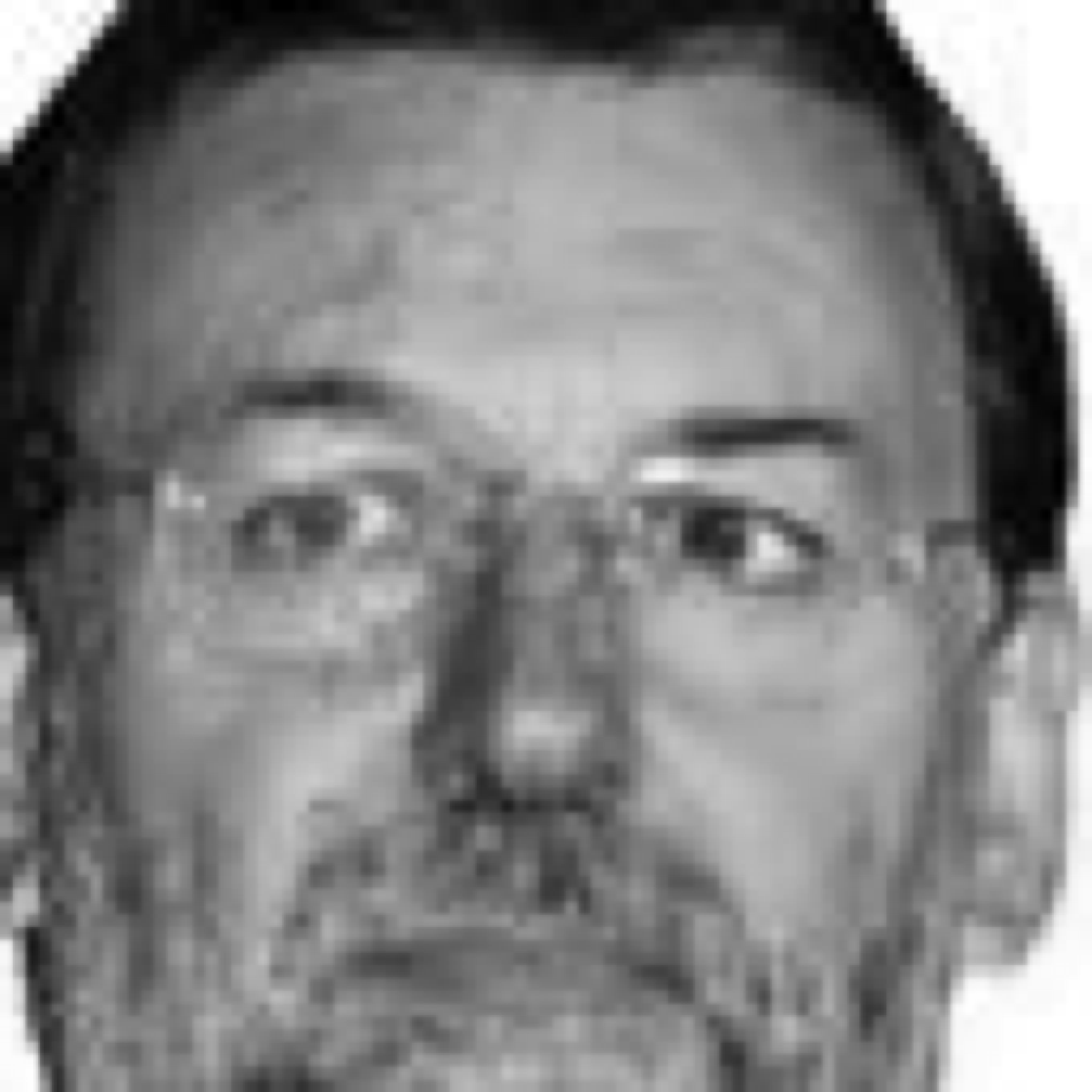
The first step is to express an image as a vector of features, converting each pixel into a number capturing how dark it is:
vIg <- as.vector(Ig)
data.frame(pixel = seq_along(vIg), intensity = vIg) |>
  ggplot(aes(pixel, intensity)) +
  geom_line(colour = "#0e8d7c") +
  labs(x = "pixel", y = "intensity",
       title = "Vector representation of an image")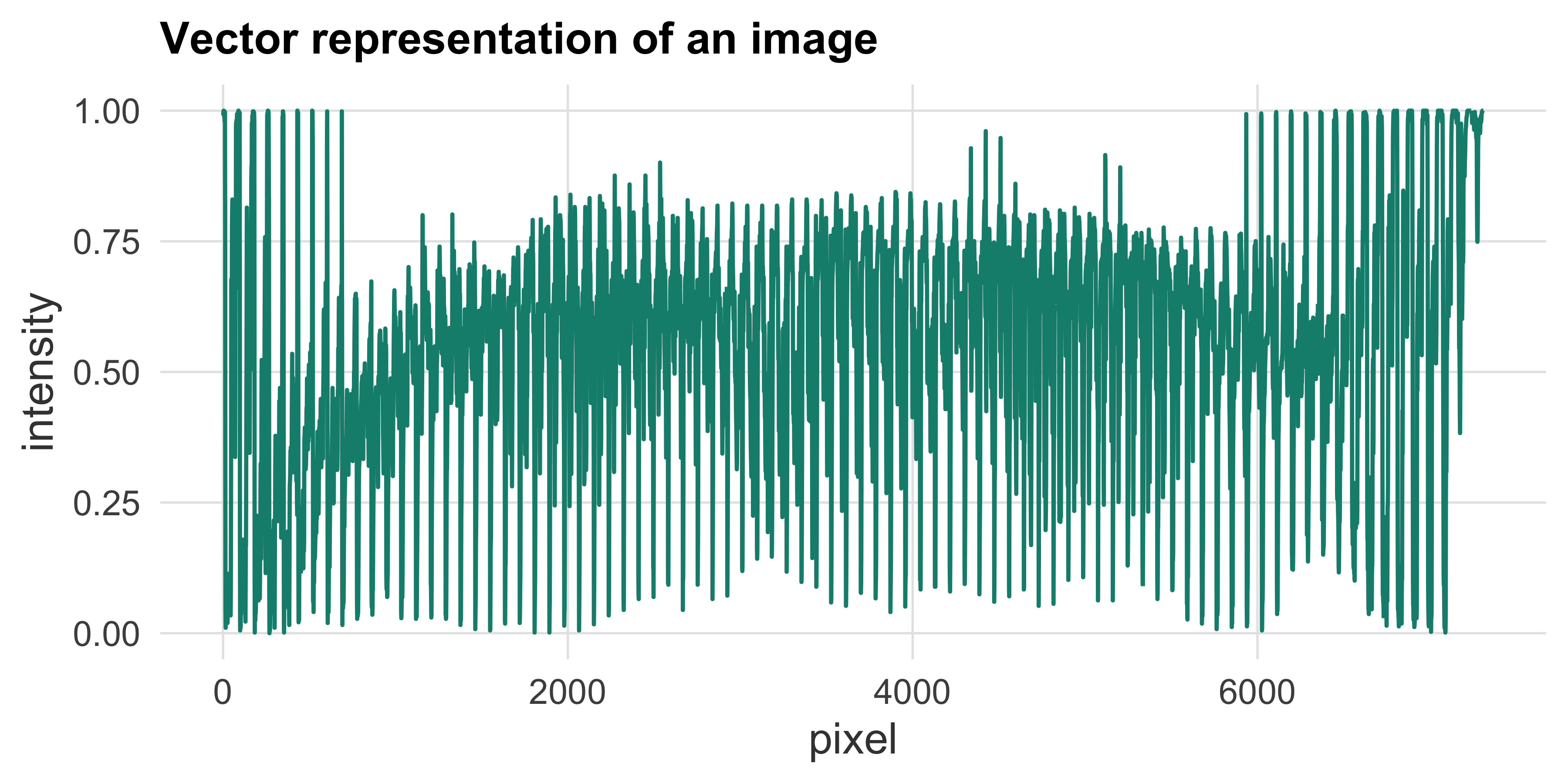
Now vIg is a 7310-dimensional vector (86 × 85 pixels) containing all the grayscale information of the image (Figure 6.3).
Data is usually placed in a matrix — the feature matrix \(X\) (Figure 6.4) — where we can access the intensity of pixel 1 of face 200 as X[200, 1] (0 is black, 1 is white).
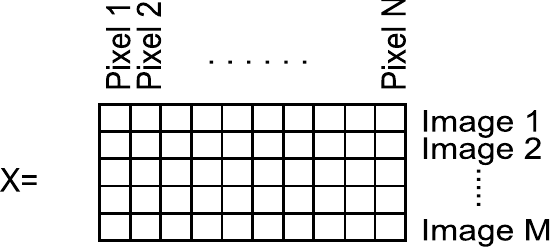
Using the Num field of finfo, we build a feature matrix holding all images in one pipeline: take the image numbers, and for each of them read its file, convert to grayscale, flatten to a vector — the \(f) lambda does that — then stack the results into a matrix:
[1] 348 7310Understand and explain the functionality of the code line above.
The pipeline reads image f (the \(f) lambda), converts it to grey (rgb2grey) and flattens it to a 7310-length vector; sapply(finfo$Num, ...) maps that over every image number and binds the results column-wise; the outer t() transposes so each row of X is one image (348 rows × 7310 pixel features).
Now X holds the vectorised images of all members, and finfo holds the information on what each row of X contains — i.e. finfo is metadata.
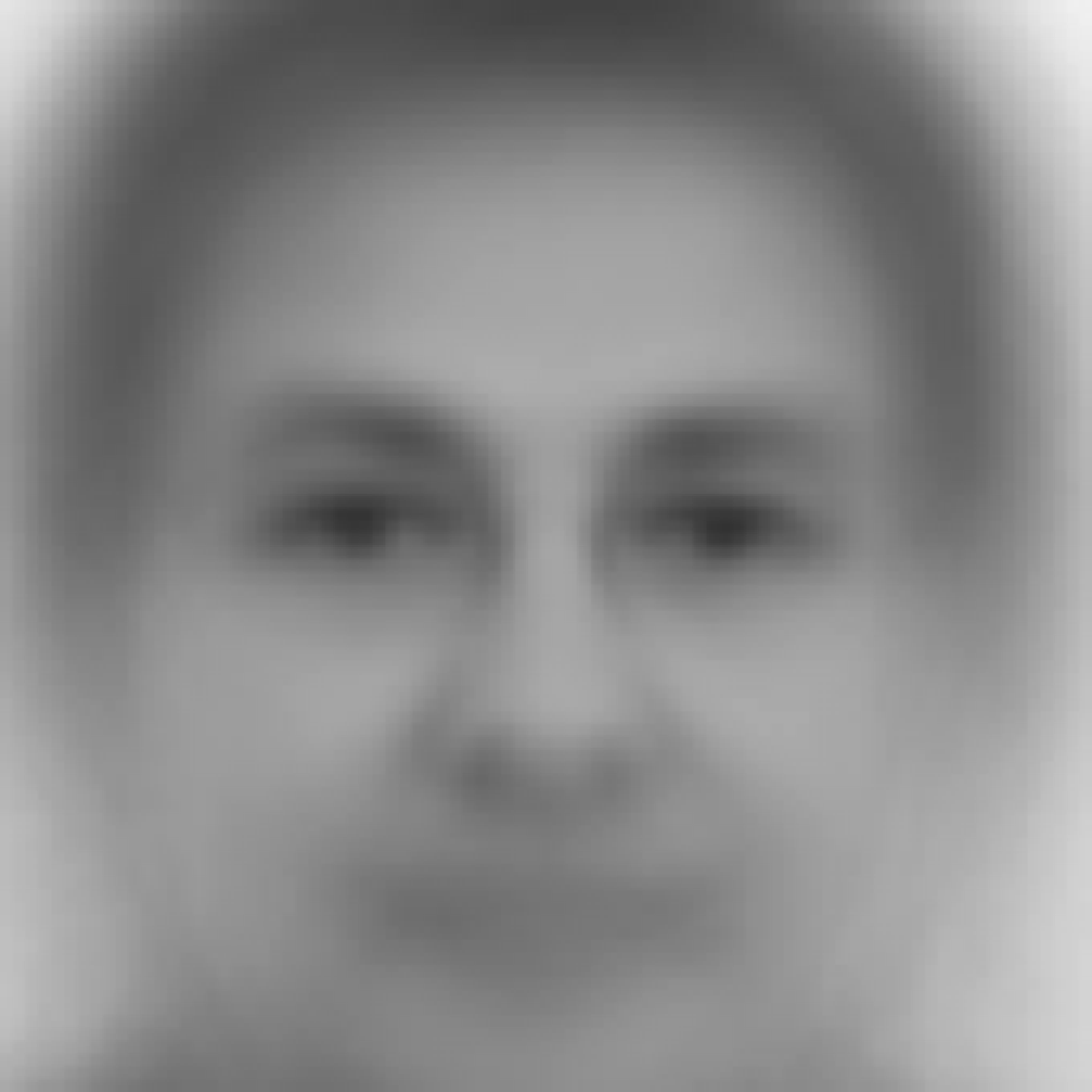
Before computing PCA we can inspect the mean image. Reconstruct it into an image matrix with a small imagematrix() helper (Figure 6.5):
PCA finds the principal orthogonal vectors that explain the main variance of the dataset. Each principal vector lives in feature space, so it is itself an image (an eigenface):
pcamod <- prcomp(X, center = FALSE)How much of the variation does each component capture? The scree plot (Figure 6.6) shows the variance explained — bars per component, amber line accumulating — a handful of eigenfaces already account for most of the structure, which is why reconstruction from few components works.
scree <- pcamod$sdev^2 |>
  (\(v) data.frame(PC = seq_along(v), variance = v / sum(v)))() |>   # one row per PC
  slice_head(n = 20) |>
  mutate(cumulative = cumsum(variance))
scree |>
  ggplot(aes(PC, variance)) +
  geom_col(fill = "#0e8d7c") +
  geom_line(aes(PC, cumulative), colour = "#b0741a") +
  geom_point(aes(PC, cumulative), colour = "#b0741a", size = 1.6) +
  scale_y_continuous(labels = scales::percent) +
  labs(x = "principal component", y = "variance explained")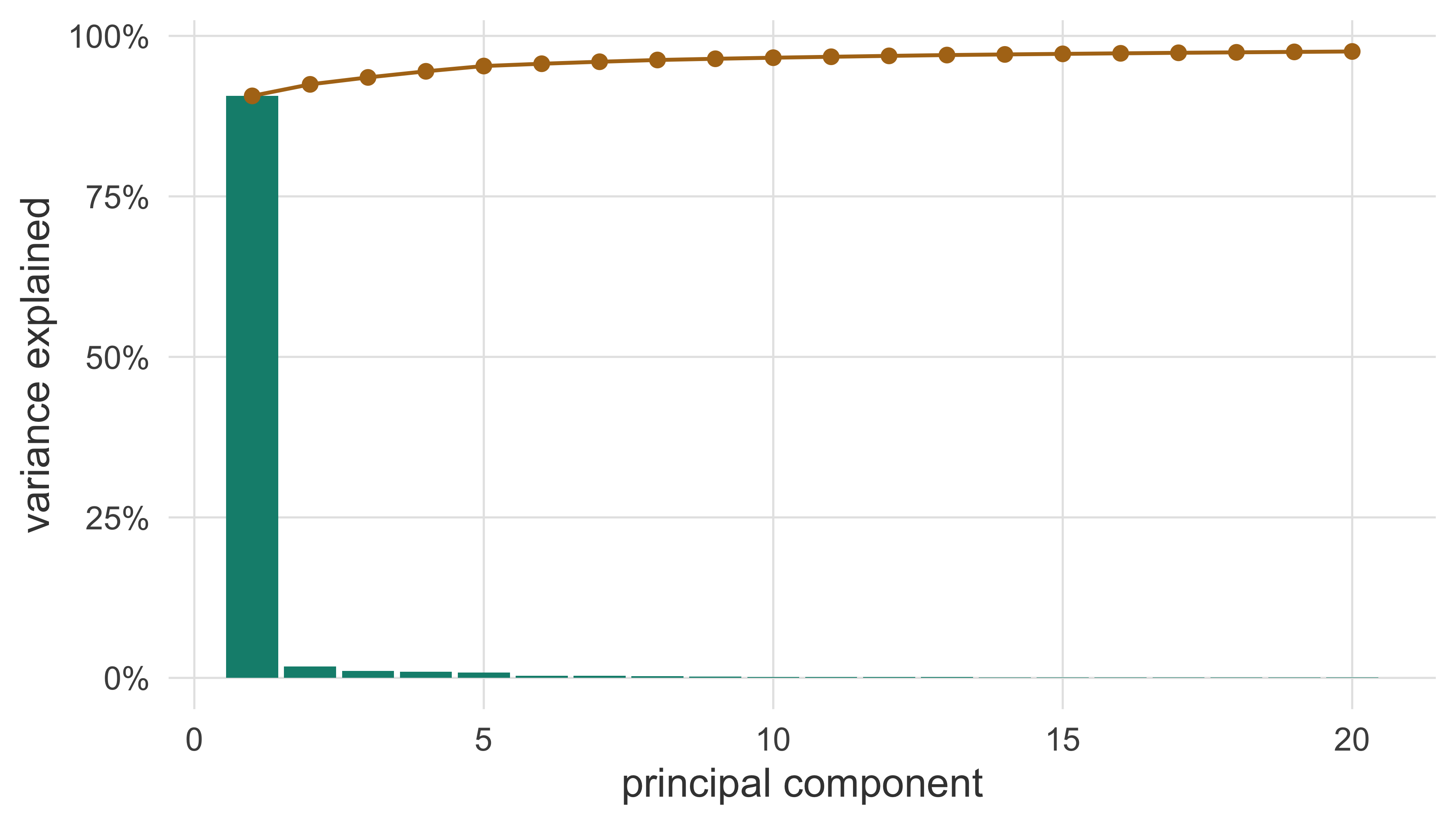
Plot the first three principal images by translating the rotation vectors into image matrices (Figure 6.7).2 Each principal vector is itself an image of dimension 7310 pixels.
normalize <- \(x, to = c(0, 1)) {
  xrange <- range(x)
  to[1] + (x - xrange[1]) / diff(xrange) * diff(to)
}
as_face <- \(v) imagematrix(normalize(v), nrow = nrow(Ig), ncol = ncol(Ig))
plot_faces <- \(imgs) {
  par(mfrow = c(1, length(imgs)), mai = c(0, 0, 0, 0))
  invisible(lapply(imgs, iplot))
}
signs <- c(-1, -1, 1)  # PC1-PC2 look like negatives without the flip
plot_faces(1:3 |> lapply(\(i) as_face(signs[i] * pcamod$rotation[, i])))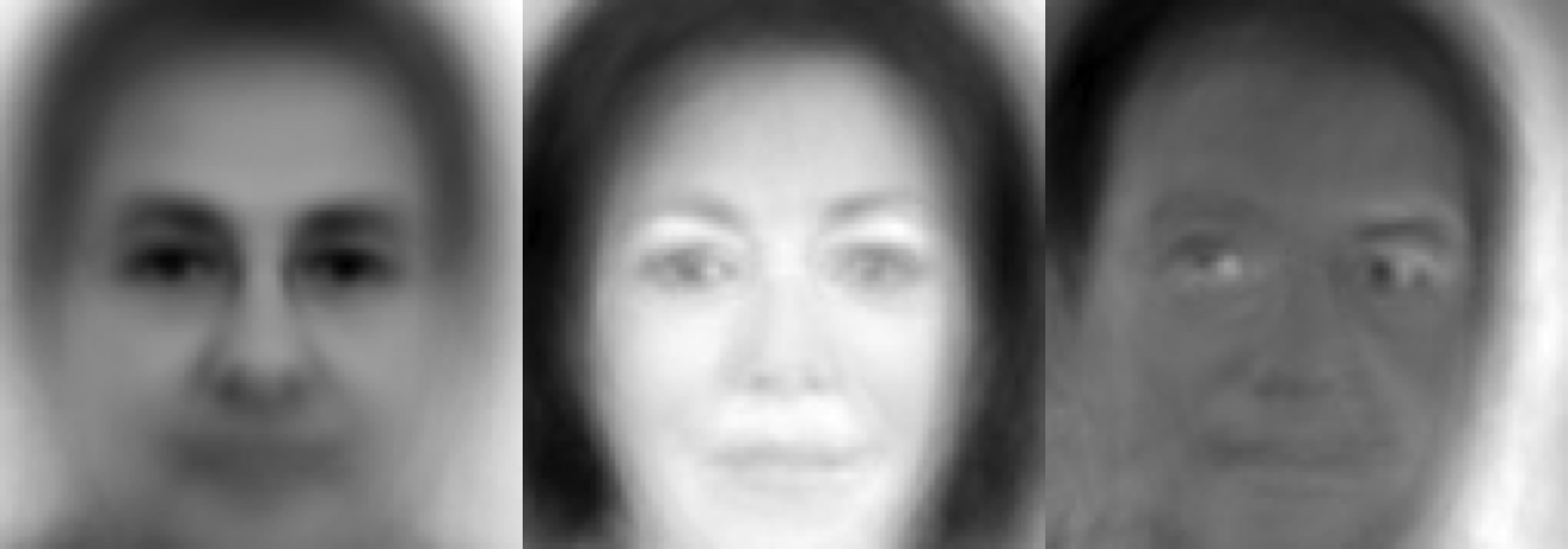
plot(pcamod). What are the differences? Can you explain them?Centering the data before PCA (Figure 6.8) changes the components markedly:
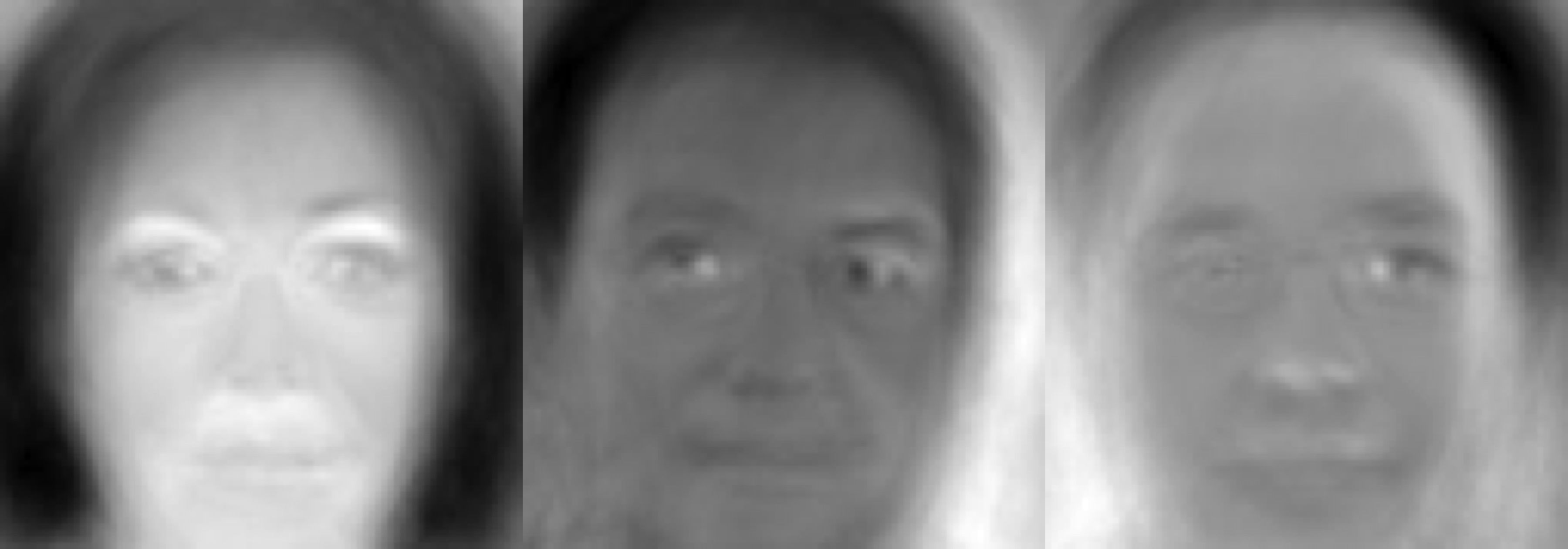
PCA provides a decomposition ordered by the major covariance directions, so it doubles as a dimensionality-reduction algorithm. Each sample has a projection (its scores) onto the subspace spanned by a set of principal components. We can plot the scores on the first two dimensions to get an idea of a high- dimensional (\(D = 7310\)) distribution through a 2D representation. We use the centered model pcamodc, whose components describe variation around the mean face — with the non-centered model the first component would largely encode the mean itself and dominate the plot.
A tidy score plot needs three ingredients: the sample scores, the metadata to colour by, and the variance explained by each component (so the reader knows how much of the cloud each axis actually shows). Two tiny helpers collect them: pca_scores() returns one tidy row per face, binding any metadata columns to the scores; pca_var() formats the axis titles with the explained variance; and gg_interactive() turns a ggplot into an interactive plotly widget wherever a browser can display it (the HTML edition) and keeps the plain ggplot anywhere JavaScript cannot run — the PDF:
pca_scores <- \(pca, info = NULL, axes = 1:2) {
  scores <- pca$x[, axes, drop = FALSE] |>
    as.data.frame() |>
    setNames(paste0("PC", axes))
  if (is.null(info)) scores else bind_cols(scores, info)
}
pca_var <- \(pca, axes = 1:2) {
  var <- (pca$sdev^2 / sum(pca$sdev^2))[axes]
  sprintf("%s (%.1f%%)", paste0("PC", axes), 100 * var)
}
gg_interactive <- \(plot, ...) {
  if (knitr::is_html_output())
    plotly::ggplotly(plot, ...)
  else
    plot
}
With the scores and metadata in one data frame, the party plot is a plain ggplot() (Figure 6.9): every face is one point, and each party is tagged once at its mean position, with ggrepel keeping the tags from colliding. The text aesthetic carries each representative’s name on the points, so hovering identifies it in the interactive HTML edition:
party_scores <- pca_scores(pcamodc, finfo |> select(Name, Surname, Party))
party_centres <- party_scores |>
  group_by(Party) |>
  summarise(PC1 = mean(PC1), PC2 = mean(PC2), .groups = "drop")
party_plot <- party_scores |>
  ggplot(aes(PC1, PC2, colour = Party)) +
  geom_hline(yintercept = 0, colour = "grey80", linewidth = 0.4) +
  geom_vline(xintercept = 0, colour = "grey80", linewidth = 0.4) +
  geom_point(aes(text = paste0(Name, " ", Surname, " (", Party, ")")),
             size = 1.1, alpha = 0.5, show.legend = FALSE) +
  ggrepel::geom_label_repel(data = party_centres, aes(label = Party),
                            size = 2.6, seed = 42, show.legend = FALSE) +
  labs(x = pca_var(pcamodc)[1], y = pca_var(pcamodc)[2]) +
  coord_equal()
gg_interactive(party_plot, tooltip = "text")The HTML edition renders this figure interactively — hover a point to identify the representative.
pca_var(pcamodc) reports the variance on each axis — the first two PCs together capture about 0.41 (41 % with this build).Repeating the projection while exposing gender instead (Figure 6.10):
gender_scores <- pca_scores(pcamodc, finfo |> select(Name, Surname, Gender))
gender_plot <- gender_scores |>
  ggplot(aes(PC1, PC2, colour = Gender,
             text = paste0(Name, " ", Surname, " — ", Gender))) +
  geom_hline(yintercept = 0, colour = "grey80", linewidth = 0.4) +
  geom_vline(xintercept = 0, colour = "grey80", linewidth = 0.4) +
  geom_point(size = 1.3, alpha = 0.6) +
  labs(x = pca_var(pcamodc)[1], y = pca_var(pcamodc)[2]) +
  coord_equal()
gg_interactive(gender_plot, tooltip = "text")A number backs the eye up — correlating each score vector with the gender indicator shows the signal lives on PC1 alone (magnitude about 0.7 — the sign is a rotation convention), with PC2 carrying none of it. That is exactly the relationship the last question of Exercise 6.4 asks you to interpret:
           [,1]
PC1 -0.71860268
PC2 0.03203211PCA is a way of building a model of a dataset. We can check the effect of keeping a limited set of components through a reconstruction experiment: a reconstruction keeps the projection of a face on the first comps eigenfaces (the scores), multiplies by the rotation and adds the mean back:
\[ \hat{X} = X_{\mathrm{scores}} \, R^{\top} + \bar{X} \]
Each column of Figure 6.11 is one representative (its number in index.csv); each row keeps comps components, from the full model of 330 at the top down to seven at the bottom.
# One tidy pixel table (row, col, value) for an image matrix, ggplot-ready.
image_long <- \(m) {
  data.frame(row = as.vector(row(m)),
             col = as.vector(col(m)),
             value = as.vector(m))
}
theme_image <- theme(                    # blank, square canvas for pixel tiles
  axis.text  = element_blank(),
  axis.ticks = element_blank(),
  axis.title = element_blank(),
  panel.grid = element_blank()
)
# Reconstruct face `id` (a row of X) keeping only the first `comps` components.
reconstruct <- \(id, comps) {
  kept <- seq_len(comps)
  rx <- pcamodc$x[id, kept, drop = FALSE] %*%
        t(pcamodc$rotation[, kept, drop = FALSE])
  (rx[1, ] + pcamodc$center) |>             # add the mean face back
    imagematrix(nrow = nrow(Ig), ncol = ncol(Ig))   # reshape to an 86×85 matrix
}
# Pixel table for a set of faces at once: each row of the matrix is reshaped,
# normalized and numbered (`face` = matrix row); optional per-face metadata
# columns (one row per face) are bound on.
faces_long <- \(m, meta = NULL) {
  px <- seq_len(nrow(m)) |>
    lapply(\(face)
             imagematrix(m[face, ], nrow = nrow(Ig), ncol = ncol(Ig)) |>
             normalize() |>
             image_long() |>
             mutate(face = face)) |>
    bind_rows()
  if (is.null(meta))
    px
  else
    bind_cols(px, meta |> slice(rep(seq_len(nrow(meta)), each = nrow(Ig) * ncol(Ig))))
}
idips     <- c(10, 254, 94, 114, 229, 233, 251, 120)   # representatives to show
infactors <- c(330, 200, 100, 50, 25, 7)               # components kept
panels  <- expand.grid(id = idips, comps = infactors)  # one row per panel
recon_m <- t(vapply(seq_len(nrow(panels)),             # faces × 7310 matrix
                    \(i) reconstruct(panels$id[i], panels$comps[i]),
                    numeric(ncol(X))))
recon_long <- recon_m |>
  faces_long(panels) |>
  mutate(face  = factor(finfo$Num[id], levels = finfo$Num[idips]),
         comps = factor(comps, levels = infactors)) |>
  select(-id)
recon_long |>
  ggplot(aes(col, row, fill = value)) +
  geom_raster() +
  facet_grid(rows = vars(comps), cols = vars(face)) +
  scale_y_reverse(expand = expansion(0)) +
  scale_x_continuous(expand = expansion(0)) +
  scale_fill_gradient(low = "black", high = "white", guide = "none") +
  coord_equal() +
  theme_image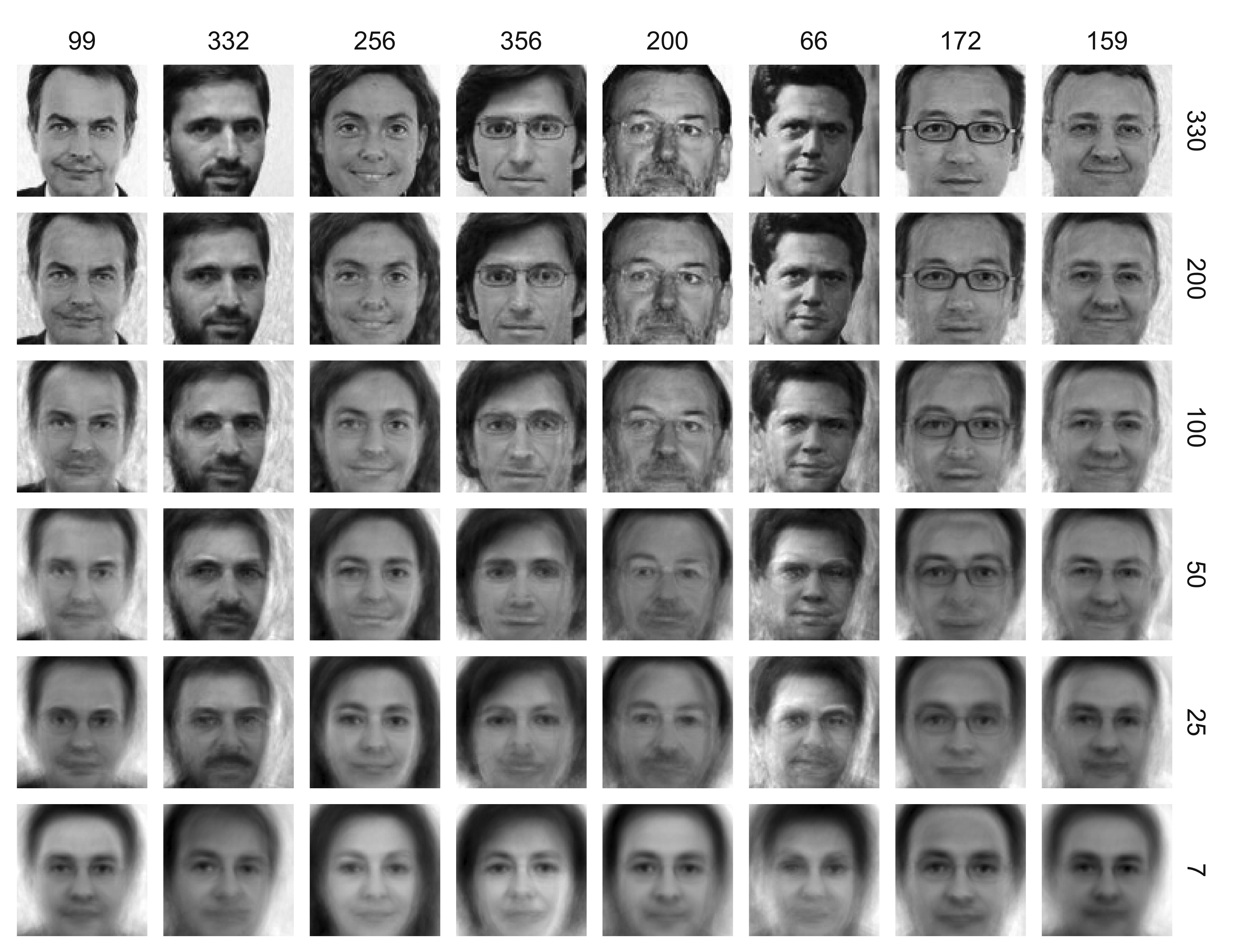
comps principal components: full model (330) down to 7. Labels are the file numbers in index.csv.
Note that here we included the target images in the PCA training set. Testing generalisation fairly is one small step away: refit the PCA without four faces and reconstruct those unseen ones from it (Figure 6.12). The model can only speak the language of the faces it learned — glasses and fine detail fade much earlier than in the in-sample grid above:
set.seed(7)
unseen <- sample(nrow(X), 4)                       # hold-out faces
pca_hold <- prcomp(X[-unseen, ], center = TRUE)    # the model, trained without them
reconstruct_unseen <- \(id, comps) {
  kept <- seq_len(comps)
  rx <- (X[id, ] - pca_hold$center) %*%            # scores of a face it never saw
        pca_hold$rotation[, kept] %*% t(pca_hold$rotation[, kept])
  (rx[1, ] + pca_hold$center) |>
    imagematrix(nrow = nrow(Ig), ncol = ncol(Ig))
}
p_h <- expand.grid(id = unseen, comps = c(100, 25, 7))
hold_m <- t(vapply(seq_len(nrow(p_h)),
                   \(i) reconstruct_unseen(p_h$id[i], p_h$comps[i]),
                   numeric(ncol(X))))
hold_m |>
  faces_long(p_h) |>
  mutate(face  = factor(finfo$Num[id]),
         comps = factor(comps, levels = c(100, 25, 7))) |>
  select(-id) |>
  ggplot(aes(col, row, fill = value)) +
  geom_raster() +
  facet_grid(rows = vars(comps), cols = vars(face)) +
  scale_y_reverse(expand = expansion(0)) +
  scale_x_continuous(expand = expansion(0)) +
  scale_fill_gradient(low = "black", high = "white", guide = "none") +
  coord_equal() +
  theme_image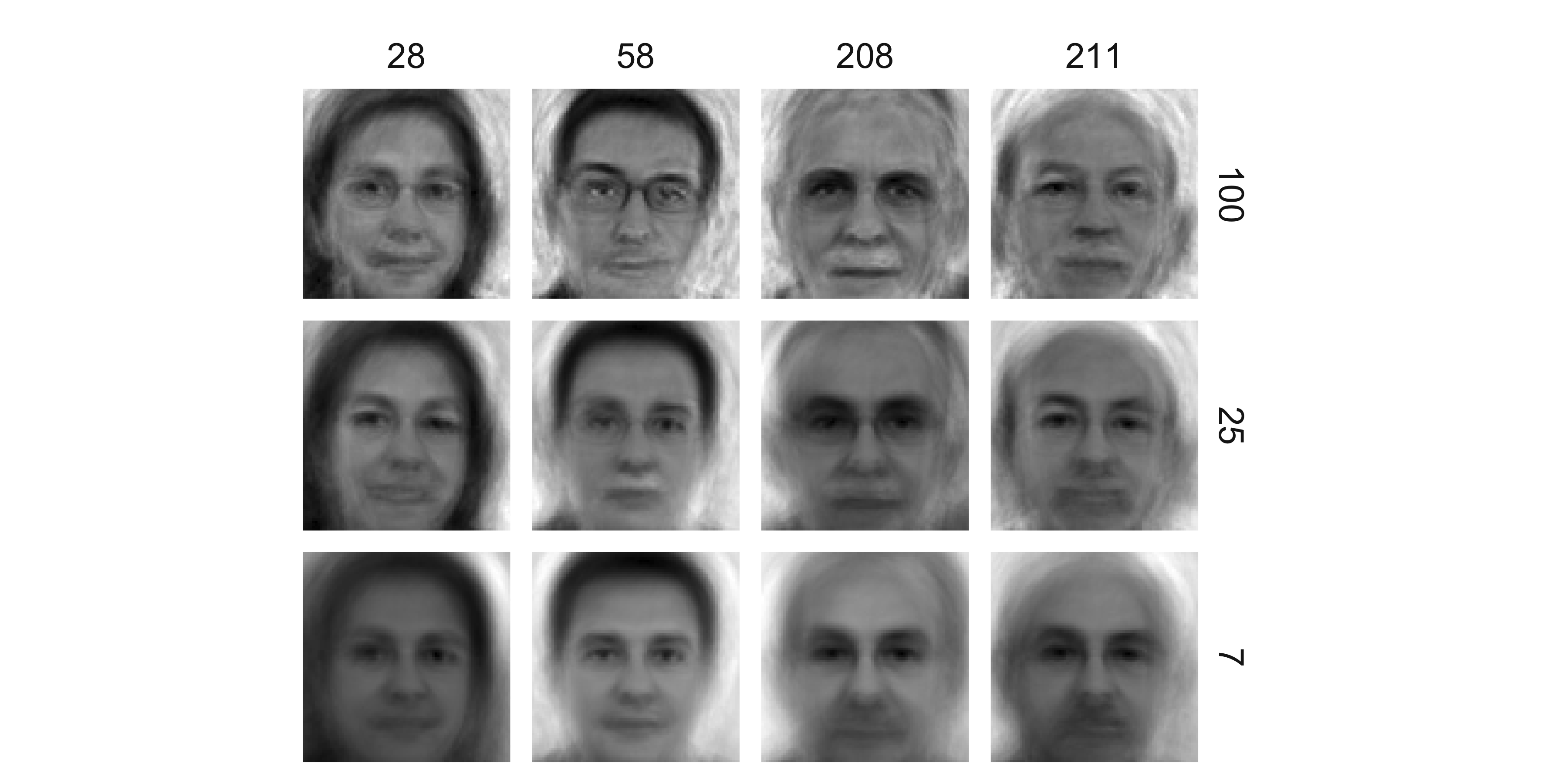
index.csv.
We can make the trade-off quantitative: reconstruction error falls as we keep more components, with diminishing returns once the leading eigenfaces are in (Figure 6.13):
infac <- c(2, 5, 10, 25, 50, 100, 200, 330)
recon_mse <- \(comps) {
  kept <- seq_len(comps)
  Xhat <- sweep(pcamodc$x[, kept] %*% t(pcamodc$rotation[, kept]),
                2, pcamodc$center, "+") |> as.matrix()
  mean((X - Xhat)^2)
}
recon <- data.frame(components = infac, mse = vapply(infac, recon_mse, numeric(1)))
recon |>
  ggplot(aes(components, mse)) +
  geom_line(colour = "#0e8d7c") +
  geom_point(colour = "#0e8d7c") +
  labs(x = "components retained", y = "mean squared error")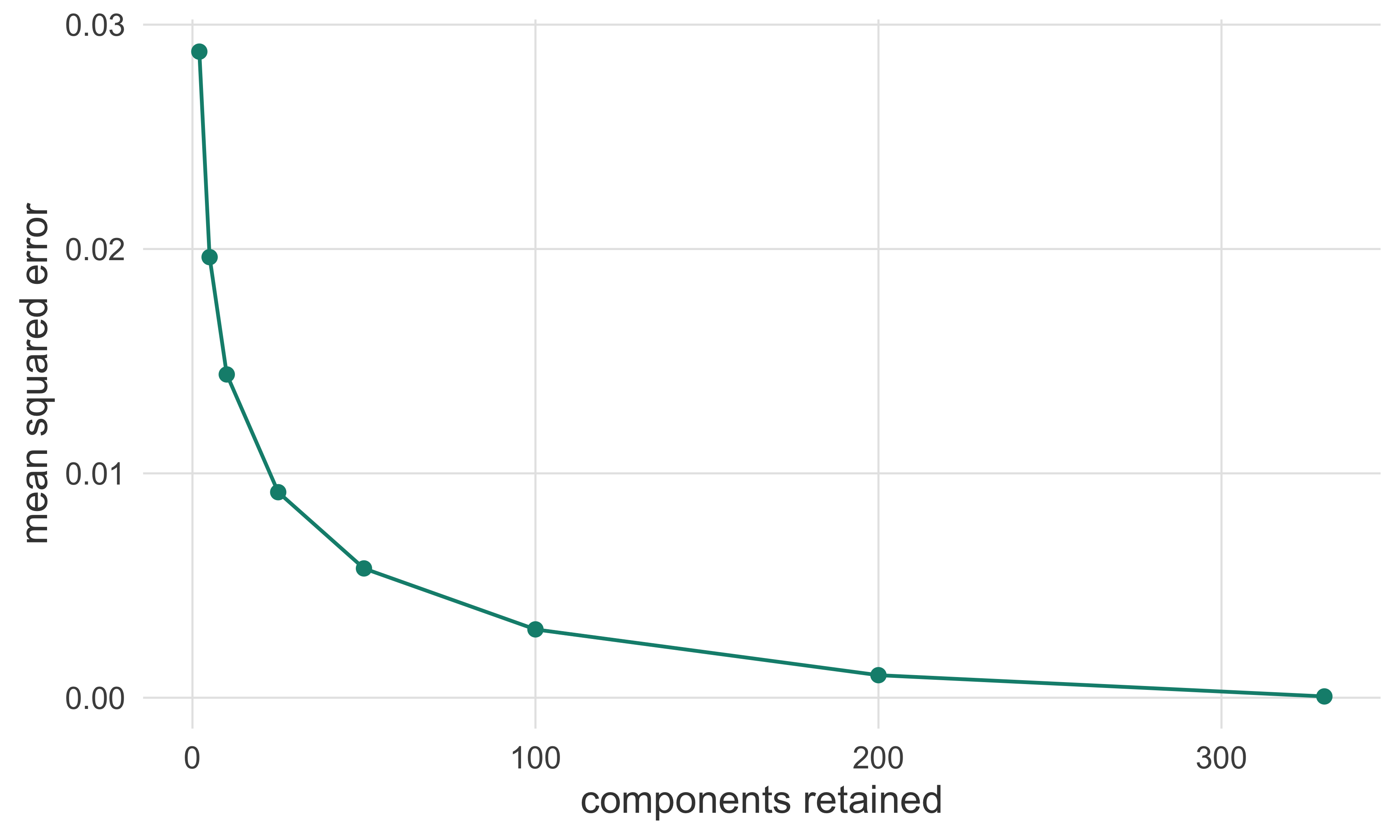
We can cluster faces with k-means (low Euclidean distance = similar). First project to a low-dimensional subspace with PCA, then cluster — and keep the tidy data with the metadata attached, since we will reuse it below:
set.seed(2025)
all5 <- pca_scores(pcamodc, finfo, axes = 1:5)    # first 5 PCs per face + metadata
X5   <- all5 |> select(starts_with("PC")) |> as.matrix()
cl <- kmeans(X5, centers = 15)
cl$size
[1] 22 16 20 22 37 19 25 27 39 33 23 24 15 14 12To inspect a cluster, plot the images assigned to it. The largest cluster holds 39 faces; a dozen of them are shown in Figure 6.14 (labels are the file numbers in index.csv):
biggest <- which.max(cl$size)
members <- which(cl$cluster == biggest) |> head(12)
member_px <- X[members, , drop = FALSE] |>
  faces_long(data.frame(num = finfo$Num[members])) |>
  mutate(face = factor(num, levels = finfo$Num[members])) |>
  select(-num)
member_px |>
  ggplot(aes(col, row, fill = value)) +
  geom_raster() +
  facet_wrap(vars(face), ncol = 6) +
  scale_y_reverse(expand = expansion(0)) +
  scale_x_continuous(expand = expansion(0)) +
  scale_fill_gradient(low = "black", high = "white", guide = "none") +
  coord_equal() +
  theme_image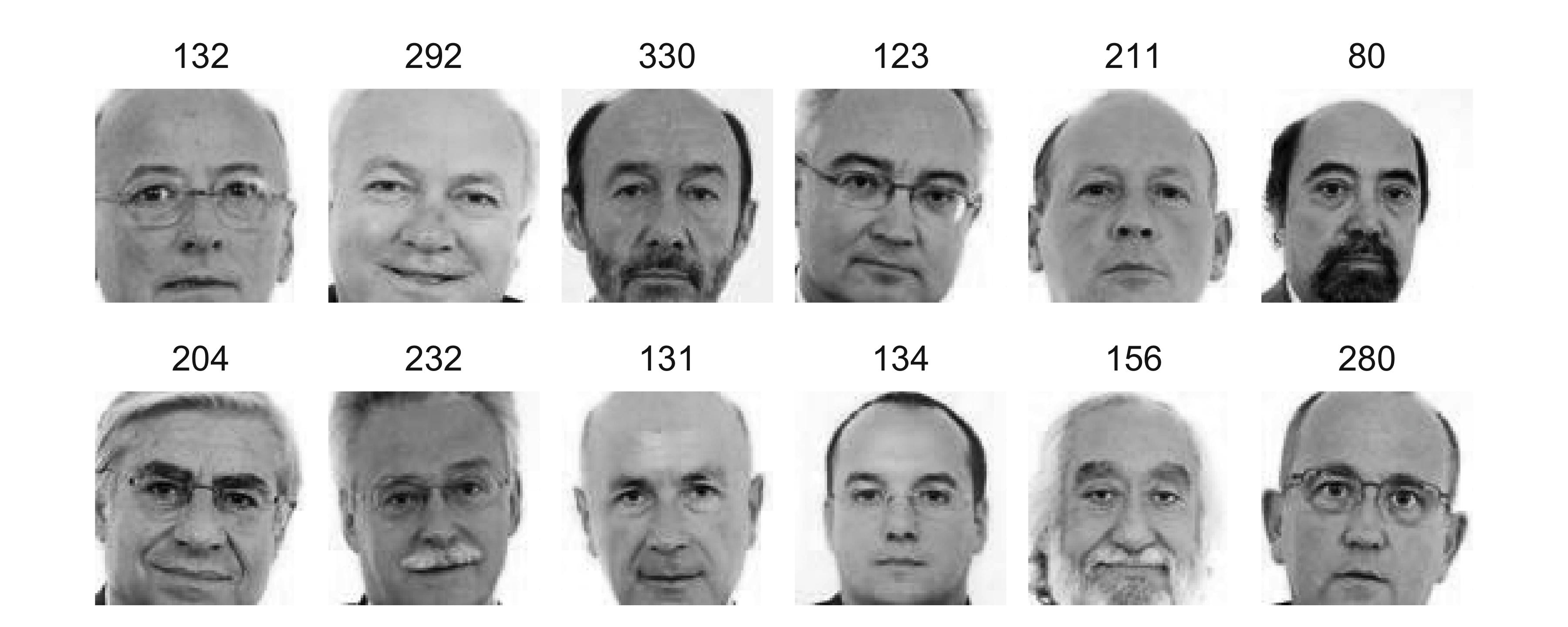
index.csv.
Observe Figure 6.14 — is the clustering truly following face features? How would you adjust the number of clusters?
With 15 centres on five PCs the clusters are not random: the largest one (39 faces with this seed, Figure 6.14) groups similar-looking men — glasses, hairline, jaw — so the clustering tracks coarse physiognomic gradients (gender, glasses, hair), never political labels. To pick the number of clusters, watch how total within-cluster sum of squares falls as centers = grows (the “elbow”: extra clusters stop paying for themselves once they split near-duplicates) — or use a measure such as cluster::silhouette. Fewer centres blend distinct kinds of face; more fragment the same kind.
We can also cluster pixels instead of faces — clustering features rather than patterns — which hints at which features behave similarly across samples. This is k-means on the transposed matrix; with t(X) the observations become the 7310 pixels. The assigned zone number is drawn as a gray level on the image (Figure 6.15):
set.seed(2025)
fcl <- kmeans(t(X), centers = 15)
zone_map <- expand.grid(row = 1:nrow(Ig), col = 1:ncol(Ig)) |>
  mutate(zone = fcl$cluster)
zone_plot <- zone_map |>
  ggplot(aes(col, row, fill = zone)) +
  geom_raster() +
  scale_y_reverse(expand = expansion(0)) +
  scale_x_continuous(expand = expansion(0)) +
  scale_fill_gradient(low = "white", high = "grey25", guide = "none") +
  theme_image +
  coord_equal()
gg_interactive(zone_plot, tooltip = c("x", "y", "fill"))Change the number of clustered features (zones) and describe the effect of increasing it.
As the number of centres grows, each zone shrinks to a finer region of pixels that behave alike across the chamber (background, hair, shirt, facial shadows); the map resolves more structure where pixels differ and coarsens where they do not. Beyond a point the zones split near-duplicate areas, the gray map becomes noisy, and the clustering stops saying anything: at the extreme each pixel is its own zone and kmeans trivially reproduces the pixels themselves.
We can repeat the analysis focusing only on face features by building a mask and applying it to the dataset (Figure 6.16):
# Mask: keep only the central rows and columns of the image.
rows <- 20:80
cols <- 20:70
mask <- matrix(0, nrow = nrow(Ig), ncol = ncol(Ig))
mask[rows, cols] <- 1
nxc <- X[, which(as.logical(mask))]           # keep only the masked features
set.seed(2025)
ccl <- kmeans(t(nxc), centers = 10)
zone_focus <- expand.grid(row = rows, col = cols) |>  # one row per pixel inside the mask
  mutate(zone = ccl$cluster)
zone_focus_plot <- zone_focus |>
  ggplot(aes(col, row, fill = zone)) +
  geom_raster() +
  scale_y_reverse(expand = expansion(0)) +
  scale_x_continuous(expand = expansion(0)) +
  scale_fill_gradient(low = "white", high = "grey25", guide = "none") +
  theme_image +
  coord_equal()
gg_interactive(zone_focus_plot, tooltip = c("x", "y", "fill"))Can you explain the new results?
Masking away the background (and the outer frame of hair and shoulders) removes the zones that whole-image clustering spent on background, shirt and edge pixels, so the centres redistribute over the interior of the face: the zones now trace features within the face — cheeks, eye sockets, nose tip, hairline — instead of separating “photo” from “wall”. Restricting features changes what the clustering can express; the zones are always relative to the region under study.
The goal here is to discriminate gender from the image alone, using a 1-NN classifier with a two-fold validation scheme. Split the dataset 50/50 into training and validation, destroying any ordering. dplyr makes the split readable — add a set column, then filter() — and two details make it sounder: sampling within each gender keeps the H/M balance of both halves exactly the same (a stratified split; a purely random draw only balances it in expectation), and n() %/% 2 tolerates an odd-sized subset:
               H   M
  train      111  62
validation 112 63train <- all5 |> filter(set == "train")
val <- all5 |> filter(set == "validation")
Xtr <- train |> select(starts_with("PC")) |> as.matrix()
Xva <- val |> select(starts_with("PC")) |> as.matrix()Predict the validation classes with knn() from the class package:
Show performance with table():
table(Predicted = pred, Observed = val$Gender) Observed
Predicted H M
H 103 16
M 9 47mean(pred == val$Gender)[1] 0.8571429The same result as a heat tile, which is worth its ink once class sets grow:
data.frame(table(Predicted = pred, Observed = val$Gender)) |>
  ggplot(aes(Observed, Predicted, fill = Freq)) +
  geom_tile() +
  geom_text(aes(label = Freq), size = 3.2) +
  scale_fill_gradient(low = "white", high = "#0e8d7c", guide = "none") +
  theme(panel.grid = element_blank()) +
  coord_equal()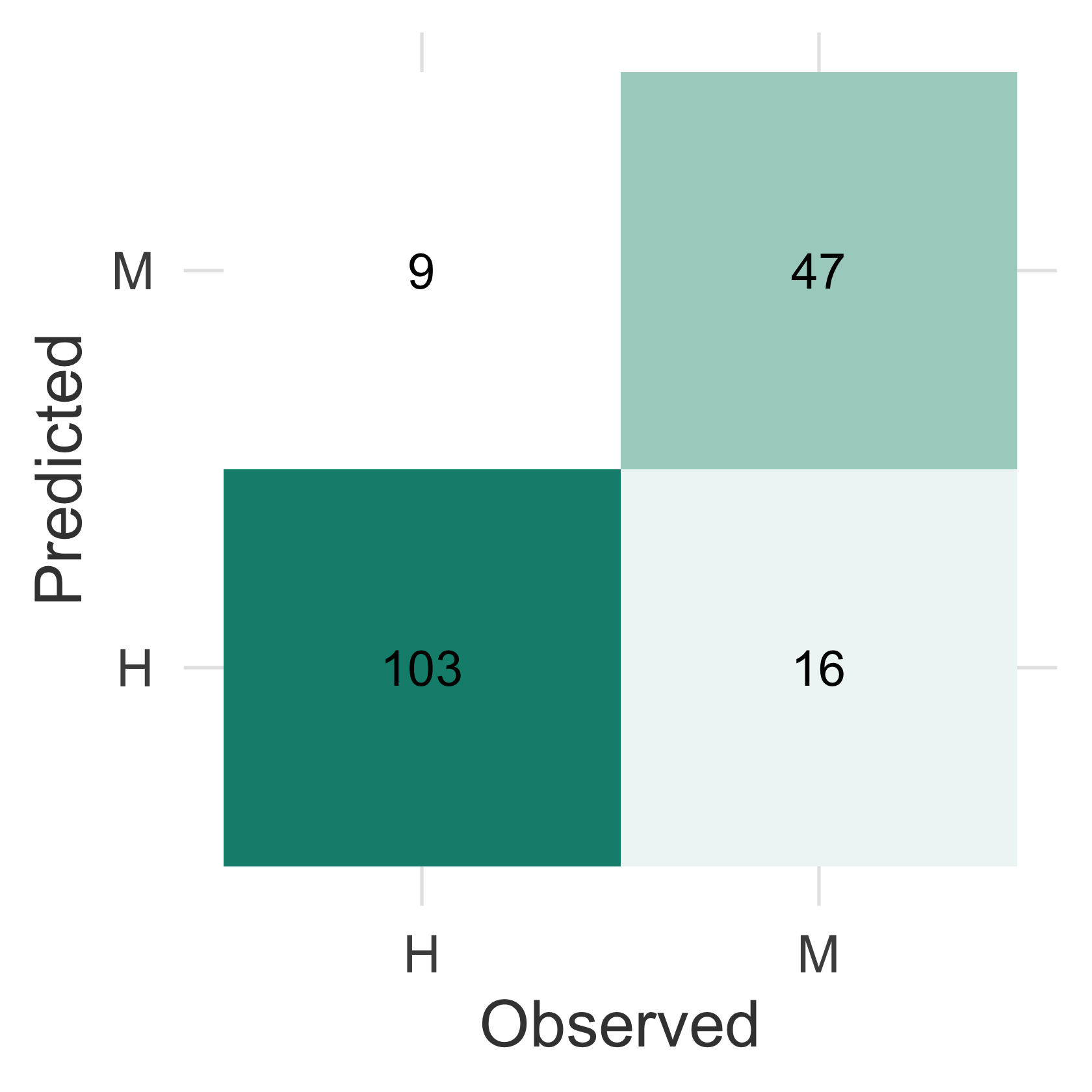
In this run we correctly identify about 85% of genders, just from the image.
A single 50/50 split is noisy. Cross-validation gives a more stable estimate and lets us tune \(k\): we average accuracy over 5 folds for a range of \(k\) (Figure 6.18). The tidy way is to build the grid of \((k, \text{fold})\) combinations, run one classifier per row, and summarise() per \(k\):
set.seed(42)
ks <- c(1, 3, 5, 7, 11, 15, 21)
fold_of <- sample(rep(1:5, length.out = nrow(all5)))   # 5 random folds
fold_acc <- \(k, f) {
  train <- fold_of != f
  truth <- all5 |> pull(Gender)
  pred  <- knn(X5[train, ], X5[!train, ], truth[train], k = k)
  mean(pred == truth[!train])
}
cv <- expand.grid(k = ks, fold = 1:5) |>
  rowwise() |>
  mutate(accuracy = fold_acc(k, fold)) |>
  ungroup() |>
  group_by(k) |>
  summarise(accuracy = mean(accuracy), .groups = "drop")
cv_plot <- cv |>
  ggplot(aes(k, accuracy)) +
  geom_line(colour = "#0e8d7c") +
  geom_point(colour = "#0e8d7c") +
  scale_y_continuous(labels = scales::percent) +
  labs(x = "k (neighbours)", y = "CV accuracy")
gg_interactive(cv_plot)This exercise trains a classifier to predict gender from face images, which is a useful teaching example of supervised learning — but automated inference of personal attributes (gender, ethnicity, sexual orientation, “trustworthiness”) from faces is scientifically fraught and ethically hazardous. Gender here is a coarse binary label from a historical roster, not a ground truth about identity; such systems encode the biases of their training data, misclassify people outside the labelled categories, and have been used to justify surveillance and discrimination. The failure is not uniformly distributed either: commercial gender classifiers err far more on darker-skinned women than on lighter-skinned men (Buolamwini & Gebru, 2018). Treat the result as a lesson in what a linear model can pick up from pixels, and discuss where deploying such a classifier would be inappropriate.
prcomp docs for PCA in base R; the class docs for knn/knn.cv; the plotly docs for the interactive figures.Worked solutions for the exercises are in the collapsed callouts below each exercise.
Write a laboratory report following the structure of this text. It should contain an introduction, the goals of each section, and a description of the results of each part. Include any graphics relevant to making your work understandable. The lab should be delivered within two weeks.
Mid-term substitutions leave gaps in the numbering: Num reaches 370 while the roster shows 348 representatives. Below, X is built in the row order of index.csv, so face numbers and matrix rows must not be conflated.↩︎
If an image looks like a negative, plot it with a leading minus sign (before pcamod$rotation).↩︎